A publisher’s page can load a lot of ad code before a visitor has even scrolled down. Every ad request, auction, third-party script, and creative uses browser resources on longer WordPress pages with several ad slots, which can add up quickly. Some of those ads may never even be seen because the visitor leaves the page before getting that far.
Lazy loading takes a different approach. Ads further down the page load as the visitor gets closer, rather than all at once when the page opens. This can cut down on requests that are never needed and give ads a better chance of being seen.
There is a catch, though. Lazy loading is all about timing. If an ad starts loading too early, you give away some of the performance benefit. If it starts loading too late, the visitor might reach the slot before the ad is ready. The trick is to give the ad enough time to load without requesting it long before there is any real chance someone will see it.
Lazy loading simply means that something on the page does not load until it is likely to be needed. For ads, this usually applies to placements that are further down the page and outside the initial viewport.
Take a long article with six ad placements. The first banner is visible as soon as the page opens, while the other five appear further down in the content. With regular loading, the browser can request all six ads right away. Lazy loading leaves the first one alone and waits to load the others until the reader gets closer.
You may already know the same concept from images and iframes. With the loading="lazy" attribute, the browser can hold off loading an offscreen resource until it gets close enough to the viewport. Google’s web.dev documentation also notes that this approach can be used for ads delivered through images or iframes.
Ad lazy loading can involve quite a bit more than adding loading="lazy" to an element, though. Depending on the setup, the ad stack has to decide when to request the ad, run the auction, and render the creative. That is why the distance between the ad slot and the viewport is relevant. Set it too close, and the ad may not be ready in time. Set it too far away, and you start losing the performance benefit you were looking for.
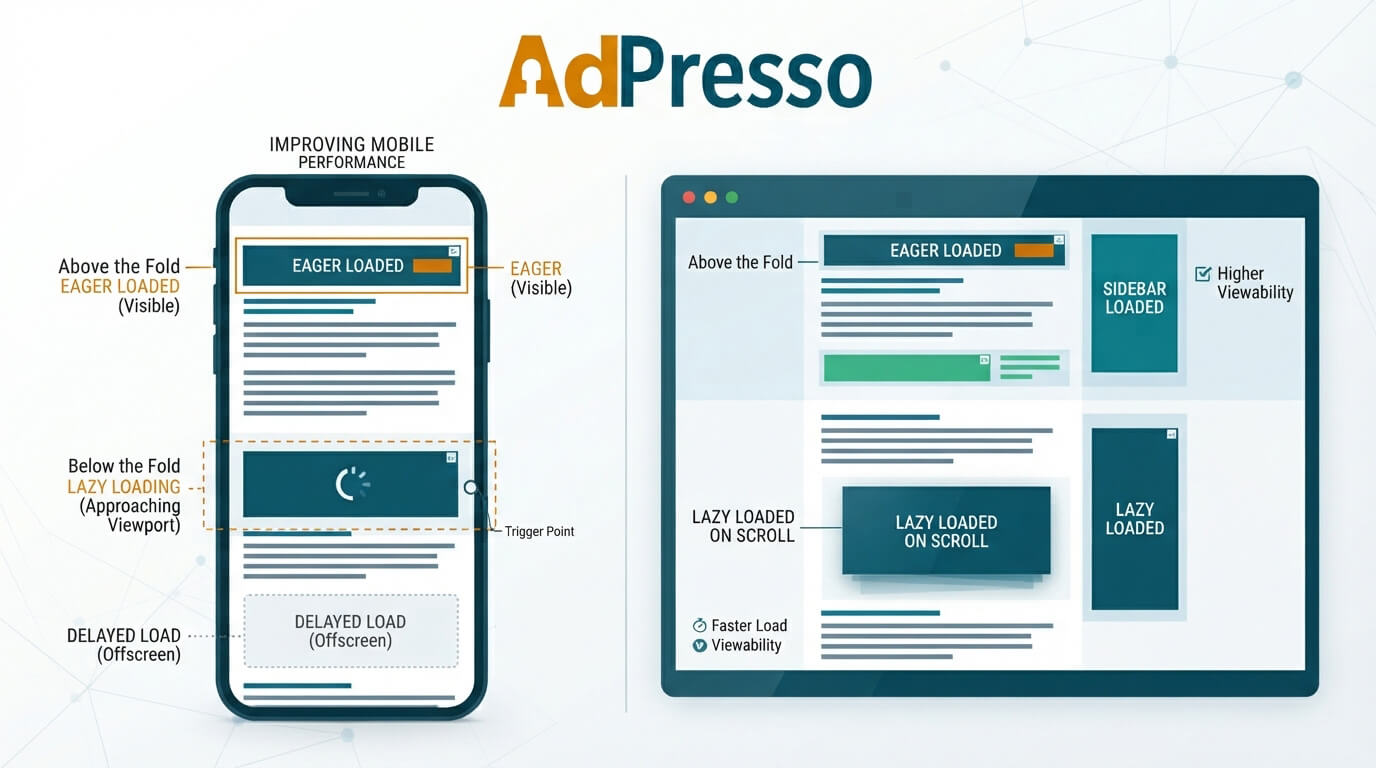
The most obvious reason is performance. A visitor doesn’t need an ad several screens below their current position. Loading it immediately consumes resources even though there is no guarantee that the user will ever see it.
There is also a monetization argument. An ad impression that loads but remains outside the viewport does little for viewability. Delaying the request until the visitor approaches the slot can increase the proportion of loaded impressions that actually become viewable. But higher viewability does not automatically mean higher revenue. Publishers need to look at impressions, viewability, eCPM, and total revenue together.
OptiDigital published a publisher dashboard example in which viewability increased by 10.6 percent while eCPM increased by 18 percent during the same period. These figures are publisher data presented by OptiDigital, not a universal benchmark. A Yieldbird case study provides another example. For the Central European publisher Infor, the company reports a 54 percent increase in viewability and a 45 percent increase in open market eCPM after implementing lazy loading. Again, this is a specific case study, not a result every publisher should expect.
Lazy loading works best when you do not treat every ad placement the same way.
An ad that is already visible when the page opens is in a different situation from one that sits several screens further down. The first one should generally load right away. Delaying it can mean the visitor sees the empty placement before the ad is ready, reducing its chance to generate a viewable impression.
You can apply the same thinking to other page elements. Google recommends avoiding lazy loading for images that are visible in the initial viewport, especially when an image is the page’s LCP element. Images further down the page are much better candidates for deferred loading.
For ads, a setup could look like this:
| Ad position | Loading approach | Reason |
|---|---|---|
| Initial viewport | Load immediately | High potential for viewability |
| Just below the viewport | Load shortly before visibility | Gives the ad time to render |
| Far below the viewport | Delay loading | Avoids unnecessary requests |
| Never reached by the visitor | No request needed | Saves resources |
The exact loading distance should depend on the site. A fast desktop connection and a slow mobile connection don’t behave the same way and scroll at different speeds. If an ad is requested only after it enters the viewport, the visitor may see an empty slot while the ad auction and rendering process run.
Lazy loading improves initial page load time by reducing the number of resources the browser must process simultaneously. A good example of this is offscreen iframes. It doesn’t make sense to load an iframe several screens below the current view when the browser can wait until the visitor scrolls closer. This approach saves data and frees up resources for the visible parts of the page that the visitor is actively using.
For publishers, lazy loading is closely related to Core Web Vitals. Ads often come with their own scripts and third-party resources, which need to load alongside the rest of the page’s content. How and when these resources load can significantly affect page speed, interactivity, and visual stability.
Cumulative Layout Shift (CLS) is a common issue associated with advertising. If an ad slot doesn’t reserve enough space, the page can shift unexpectedly when the ad appears. This can be especially frustrating for visitors trying to read or click content. By reserving space for the ad before it loads, you can prevent surrounding content from moving around.
For below-the-fold ad placements, it’s helpful to define the expected width and height of the ad space before implementing lazy loading. This way, the ad can load as the visitor approaches the placement, without disrupting the layout when it finally appears.
AdPresso supports this functionality through its placement settings. You can add custom classes or inline CSS and use a minimum height to reserve space for an ad before it loads.
Lazy loading can improve performance, but it can also create new problems when applied too aggressively.
One example is an above-the-fold ad that gets delayed along with everything else. It may take longer to appear even though the visitor can see the placement right away. The opposite can happen further down the page. If the loading threshold is set too close to the viewport, the visitor might reach the ad before it has finished loading. Move the threshold too far in the other direction and ads start loading so early that you lose much of the performance benefit.
There is also a revenue tradeoff. Lazy loading can reduce the number of delivered impressions. For a publisher, the key question is therefore whether the additional viewability and higher eCPM make up for the impressions that are no longer served.
Ad latency makes the timing even more important. GeoEdge cites research based on four billion impressions and reports that an additional second of delay was associated with 1.1 percent fewer mobile impressions and 1.9 percent fewer desktop impressions. The source also links slow demand partner responses to lower viewability.
The real challenge with lazy loading is timing it right. The ad should have enough time to load and render before the visitor gets there, without starting the whole process long before the slot is likely to be seen.
For a WordPress publisher, the easiest approach is to manage lazy loading through the ad management layer rather than adding custom JavaScript to individual posts.
AdPresso uses placements as the structural connection between advertising and the WordPress layout. In AdPresso Pro, placement settings include lazy-loading options, so you can configure behavior alongside position and ad assignment rather than scattering it across theme files or individual articles.
A typical setup could use a Content Placement for ads inside articles and apply lazy loading to the placements that appear further down the page. The first ad position can remain eager while subsequent positions load as the reader approaches them.
That approach also makes testing easier. Instead of changing dozens of posts, you can adjust the relevant placement and evaluate the resulting metrics across the affected inventory.
Do not judge a lazy loading implementation by PageSpeed alone. The important question is what happens to the advertising business after the change.
At minimum, compare the following metrics before and after implementation.
| Metric | What to look for |
|---|---|
| Viewability | Does the share of viewable impressions increase? |
| eCPM | Does higher viewability translate into stronger pricing? |
| Impressions | How many impressions are lost through delayed loading? |
| Revenue | Does total revenue remain stable or improve? |
| LCP | Does initial loading become faster? |
| INP | Does the ad stack create less main thread work? |
| CLS | Does the layout remain stable when ads appear? |