Below the fold is the part of a website that visitors see after they scroll. For publishers, it covers advertising placements outside the initial viewport and therefore behaves differently from above-the-fold inventory.
A below-the-fold ad does not need to load when the page first opens. What matters is that it loads as the visitor approaches the placement and becomes visible long enough to count as a viewable impression.
When a visitor opens a website, the browser initially displays only the content that fits into the current viewport. Everything further down the page sits below the fold until the visitor scrolls.
The exact position of the fold depends on the device, screen size, browser window, page layout, and display settings. A placement that is several paragraphs below the headline on desktop can be much further down on a smartphone.
The term below the fold comes from newspaper publishing, where important headlines and images were placed in the upper half of the front page because that part remained visible when the paper was folded (Above the fold). Websites have no physical fold, but the expression has remained useful for describing content outside the initial viewport.
Below the fold, therefore, does not mean an ad cannot be seen. It simply means that the visitor needs to scroll before the placement enters the viewport.
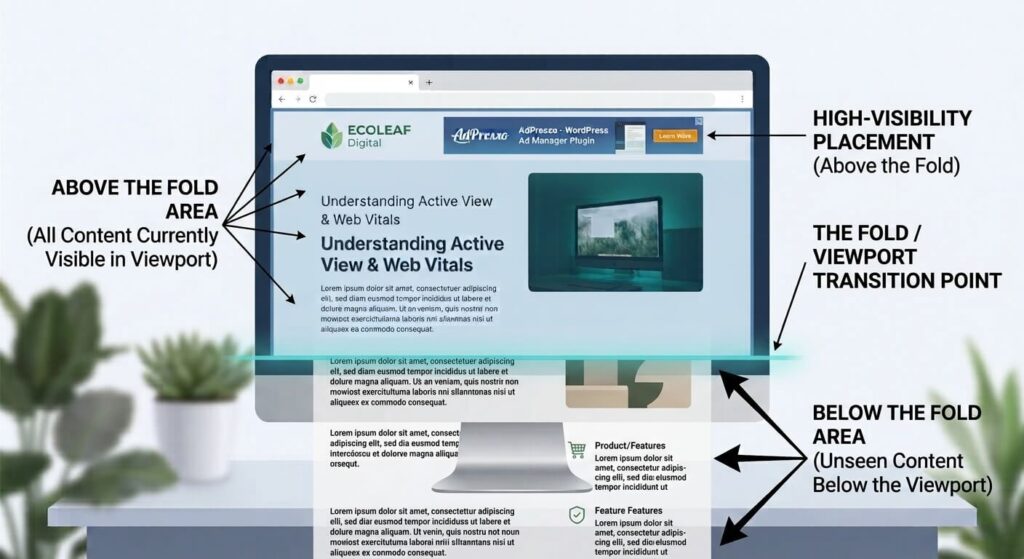
An impression can be served even when the visitor never reaches the placement. Google Active View considers a standard display impression viewable when at least 50 percent of the ad is visible in the browser window for at least one continuous second. Larger display ads use a different threshold. The ad must also render before it can become viewable. If a visitor leaves the page, scrolls past the placement immediately, or never reaches it at all, the impression may not meet the viewability criteria.
For publishers, this means that a below-the-fold placement can have plenty of impressions but relatively low viewability if visitors rarely scroll far enough to see it. The opposite can also happen. A placement further down an article may perform well if visitors regularly reach that point and spend time reading the surrounding content.
Several factors affect how often visitors actually see an ad below the fold.
Scroll behavior is the most obvious one. Visitors who leave an article quickly may never reach lower placements. On a long article, however, a reader who spends several minutes on the page can pass multiple advertising positions.
Content length also matters. A placement after paragraph ten behaves differently on a 500-word article than on a 3,000-word guide. The same position can therefore produce very different results across various content types.
Device and viewport size add another variable. Mobile visitors generally see less content at once, so they may need to scroll further before reaching an ad. At the same time, a visitor reading on a small screen may spend considerably more time scrolling through an article before leaving.
Finally, loading behavior affects what happens when the visitor reaches the placement. If an ad is requested too late, the visitor may arrive at an empty space and keep scrolling before the creative renders.
This is one reason below-the-fold advertising should not be judged by position alone. Actual viewability data gives publishers a much clearer picture of how individual placements perform.
Below-the-fold placements are a natural use case for lazy loading. There is little benefit in loading an ad immediately if the visitor is still several screens away from it and may never scroll that far.
Lazy loading delays ad rendering until the placement approaches the relevant part of the viewport. This reduces unnecessary ad requests during the initial page load and keeps resources available for the content the visitor is currently viewing.
AdPresso Pro provides Lazy Loading as part of its placement settings. For long articles with several advertising positions, this can be particularly useful. Ads further down the page do not have to compete with the initial content for resources before the visitor has shown any interest in reaching them.
Lazy loading determines when an ad loads, but not whether visitors actually see it. For that, publishers need viewability data. Platforms such as Google AdSense and Google Ad Manager provide Active View metrics, though this type of reporting isn't available for every ad network.
For WordPress publishers, AdPresso brings this measurement directly into the ad management workflow. It is currently the only WordPress ad management plugin that collects Active View data and makes it available in the WordPress backend.
This makes it easier to compare placements based on actual visibility. An ad after the fifth paragraph, for example, may achieve a higher viewability rate than one after the tenth simply because more visitors reach it. The results can also differ between desktop and mobile, where viewport size and scrolling behavior change how visitors encounter the same placement.
Below-the-fold ads can also affect page performance if advertising resources load too early or late-loading creatives change the layout. Lazy loading can reduce the amount of advertising work performed during the initial page load. Reserving appropriate space for an ad helps prevent content from moving when the creative appears.
The relevant Core Web Vitals are:
| Metric | What it measures | Below-the-fold concern |
|---|---|---|
| LCP | Loading performance | Ads outside the initial viewport should not unnecessarily compete with the main content |
| CLS | Visual stability | Late-loading ads should have enough reserved space to avoid layout shifts |
| INP | Responsiveness | Excessive client-side advertising work can affect interactions |
The performance goal is straightforward. A visitor should not have to wait for advertising several screens below the fold before the content in the initial viewport becomes usable.
For below-the-fold ads, performance starts with loading them only when they are needed. Lazy Loading prevents ads outside the initial viewport from competing with the content visitors see first.
The loading threshold should match the placement’s distance from the viewport. Google Publisher Tag (GPT), for example, uses dynamic thresholds that typically begin around one viewport length or roughly 200 to 500 pixels before an ad enters the visible area. A practical setup is:
For ads within long-form content, publishers should also avoid placing several units close together. Ad Repeat can automatically distribute ads throughout the content at defined intervals. AdPresso offers three intensity levels, allowing publishers to control how often ads repeat without manually defining every insertion point.
Finally, use Active View Tracking to check whether these placements actually become visible. This is especially useful when testing different thresholds and repeat intervals because it shows whether additional placements contribute viewable impressions or simply increase the number of served ads.
Not necessarily. Their value depends on how often visitors reach the placement and how long the ad remains visible. Viewability data provides a better basis for comparison than position alone.
Lazy loading prevents ads from loading unnecessarily early when they are still far outside the visitor's viewport. The ad can load as the visitor approaches the placement.
AdPresso Active View Tracking lets publishers measure the viewability of their ad placements directly in WordPress and compare how different positions perform.