Above the fold is the part of a webpage that visitors can see before they scroll. For publishers, this initial viewport matters because it dictates what content and advertising people see first upon arrival.
Where an ad appears in this area can influence its opportunity to be seen, but its position alone does not determine viewability. A placement can be above the fold and still produce a non-viewable impression if the ad loads too late, moves out of the viewport, or remains visible for too little time.
Think of the moment a visitor opens a page. Before scrolling, the browser shows a limited section of the website. Depending on the device and screen size, this might include the navigation, headline, an image, the beginning of the article, and perhaps an advertising placement. This initial visible area is what publishers mean by above the fold.
The expression comes from newspaper publishing. Newspapers were traditionally folded for display, so editors placed important headlines and images in the upper part of the front page where they could attract attention before a reader picked up the paper.
Websites have no physical fold. The digital fold changes with the available viewport. A desktop monitor can display much more vertical content than a smartphone, while browser controls, screen orientation, display scaling, device dimensions, and the page layout also affect what visitors see before they scroll.
Consequently, no universal pixel position exists for the fold. Above the fold simply describes the content a visitor sees inside their initial viewport.
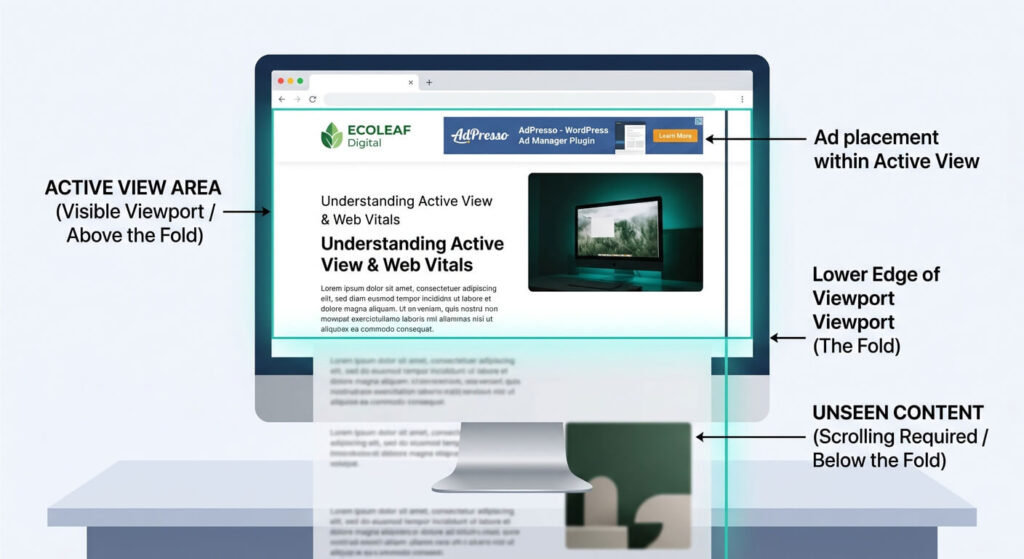
The distinction is important for advertising. Above the fold describes where a publisher places an ad. Viewability describes whether the ad was actually visible to the visitor according to a defined measurement standard.
Google Active View considers a standard display impression viewable when at least 50 percent of the ad is visible in the browser window for at least one continuous second. Larger display ads use a different visibility threshold.
Google also explains that an ad must render before it can become viewable. The visitor must reach a position where enough of the ad is visible, and the ad must remain there for the required amount of time. Google's explanation of viewability covers these requirements in more detail.
This means you can place an ad right at the top of the page, yet the unit still fails to become a viewable impression.
Placing an ad near the top of a page makes it easier to see. But it does not guarantee that opportunity will become a viewable impression. Several technical and behavioral factors can interfere.
Advertising often depends on external ad servers, auctions, scripts, and other resources. If the creative has not rendered when the visitor reaches the relevant part of the page, its position does not help.
Google explicitly includes rendering among the conditions required for a viewable impression. Google Active View therefore distinguishes between an ad being served and an ad actually becoming visible.
Visitors do not have to wait for an advertisement to become viewable. If someone opens an article and immediately scrolls past the first screen, an ad can leave the viewport before it has remained visible for the required amount of time. In that case, the placement was above the fold when the page loaded, but the impression may still not qualify as viewable.
Dynamic content can change an ad's position after the initial page render. A late-loading image, an injected element, or an advertising container without reserved space can move surrounding content. This creates a poor user experience and can also affect whether an ad remains in the intended part of the viewport.
A layout that looks reasonable on a desktop screen can behave very differently on a smartphone.
For example, a large banner can occupy much of the first mobile viewport. A sticky navigation element can reduce the available space even further. The headline and introductory content may then move below the initial screen. This is why above-the-fold optimization needs to account for different devices rather than relying on one fixed page layout.
The practical question for publishers is not simply where an ad appears, but whether visitors actually see it or not. Active View provides that additional perspective. Publishers can find viewability metrics in platforms such as Google AdSense and Google Ad Manager, but relatively few ad networks provide comparable visibility data.
This is where AdPresso comes in. AdPresso is the only WordPress ad management plugin that collects Active View data and presents it clearly in the WordPress backend. Instead of relying on a placement’s position alone, you can compare actual visibility and see how different placements perform.
This is particularly useful when testing above-the-fold placements. An ad above the article title may look like the obvious premium position, but the data can show whether visitors actually see it. The same applies to desktop and mobile layouts, where viewport size and user behavior can produce very different results.
Active View Tracking therefore connects ad placement with actual visibility and gives WordPress publishers a practical way to evaluate whether their premium positions really perform as expected.
Above-the-fold optimization also needs to consider page performance. Advertising is only one part of the website, but it can affect how quickly content appears and how stable the layout remains.
These three Core Web Vitals are particularly relevant.
| Metric | What it measures | Typical above-the-fold concern |
|---|---|---|
| LCP | Loading performance | Heavy resources can delay the main content from rendering |
| CLS | Visual stability | Ads without reserved space can move content after the page starts loading |
| INP | Responsiveness | Excessive client-side work can make interactions feel slow |
The connection is especially clear with CLS. If an ad container has no defined space and the creative appears later, the surrounding content can move when the browser inserts the ad. Reserving appropriate space for the placement helps prevent this type of layout movement.
AdPresso placement settings support layout controls and allow publishers to define a minimum ad height. This can help reserve space before an ad loads and reduce unexpected movement around the placement.
The same principle applies to the initial loading experience. Publishers should avoid letting advertising resources delay the content visitors came to read. To balance loading speed and user experience, AdPresso lets you configure placement performance settings to prioritize quick rendering for high-impact above-the-fold inventory, improving Core Web Vitals like Largest Contentful Paint (LCP).
A good above-the-fold layout is not about pushing as many ads as possible into the first viewport. It is about giving advertising a realistic chance to be seen while keeping the main content accessible and the page stable.
For publishers, that starts with a sensible placement and enough reserved space for the ad to load without moving the surrounding content. Responsive layouts are equally important because the available viewport differs significantly between desktop and mobile devices.
Loading performance should also factor into the decision, especially when ad scripts and creatives compete with the main content for browser resources.
Most importantly, publishers should measure actual visibility instead of assuming that a top position automatically performs well. AdPresso Active View Tracking makes that possible directly within WordPress.
Above the fold tells you where the ad is. Active View Tracking helps you understand whether visitors actually saw it.
Above the fold is the part of a webpage that visitors can see before they scroll. Its exact position changes depending on the visitor's viewport, device, browser, and page layout.
Ads in the initial viewport can become visible without requiring the visitor to scroll. However, their position does not guarantee a viewable impression.
No. Position alone does not determine viewability. For standard display advertising, Google Active View requires at least 50 percent of the ad to be visible for at least one continuous second.
Active View Tracking measures whether advertising impressions meet defined viewability criteria. AdPresso integrates Active View Tracking into its WordPress ad management workflow.
Publishers can use viewability measurement to compare how different advertising placements perform. AdPresso provides Active View Tracking directly within WordPress so publishers can evaluate actual ad visibility instead of relying only on placement position.
Advertising can influence loading performance and visual stability. Ads that load late without reserved space can contribute to layout movement, while heavy resources can affect the loading experience. A balanced layout should consider both advertising and page performance.