In September 2026, Google added an AdSense setting called Maximize message coverage. It decides what happens when an ad request from the EEA, the UK, or Switzerland arrives without a TCF consent string. If the setting is on, Google’s own consent tool steps in: it collects consent itself and can create a consent message for your site automatically.
For many WordPress sites, this matters right now. Many publishers use a consent plugin that isn’t connected to the IAB Transparency and Consent Framework (TCF). Their AdSense requests carry no consent string, and this setting covers exactly that. This guide explains what the setting does, how to tell whether your site is affected, and which setup avoids a second consent banner.
Sources: Google’s help page on message coverage and the AdSense announcements.
On WordPress, consent usually comes from a plugin. Many of these plugins work with services and categories, such as “Marketing” or “Google AdSense”, and unlock scripts once the visitor agrees. That protects your visitors, but it does not create a TC string. When the AdSense script then loads, Google receives a request without TCF consent data.
With message coverage switched on, Google may treat this as a gap and show its own consent message. The result can be two consent dialogs on one page: your plugin’s banner and Google’s message. Since 2024, Google also requires a Google-certified CMP for personalized ads to visitors in the EEA, the UK and Switzerland, so a setup without TCF has limits beyond this new setting.
This article explains technical settings in AdSense and WordPress. Which consent setup fits your site depends on your situation. Please check it with your legal advisor.
typeof window.__tcfapi in the browser console. If the result is "undefined", your site has no TCF API and AdSense requests carry no TC string. Our guide to TCF signals on WordPress shows how to inspect the full signal.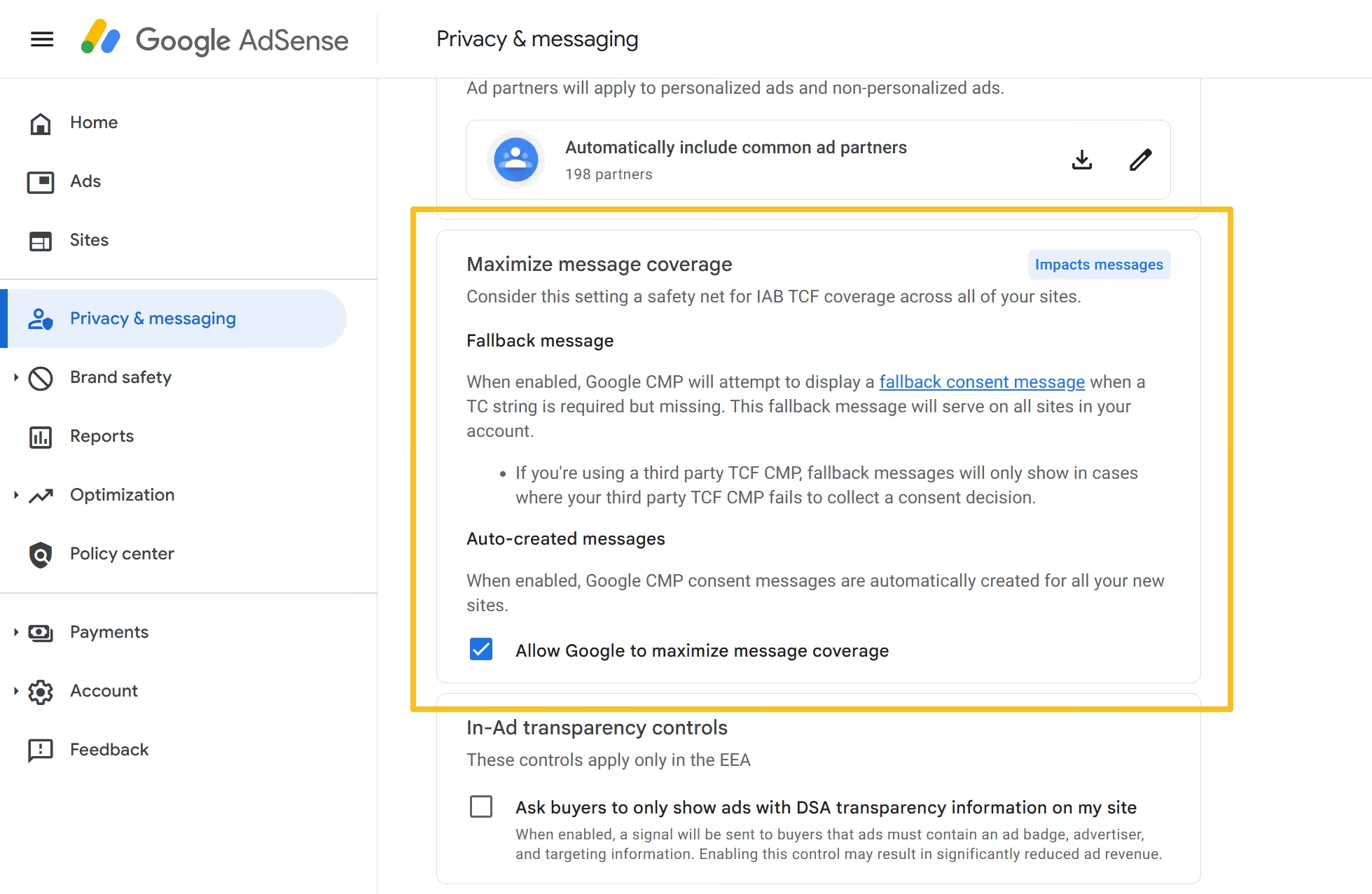
| Setup | What happens with message coverage on | Good to know |
|---|---|---|
| Google-certified CMP with TCF, as a plugin or a cloud service | Requests carry a TC string. Google’s fallback is not needed. | Several WordPress consent plugins offer an optional TCF mode. Check whether yours does and whether it is certified by Google. |
| Google’s own consent message as your CMP | Google collects consent and passes it on through the TCF. | Set it up intentionally under Privacy & messaging instead of relying on the fallback, and remove other ad banners. |
| Consent plugin without TCF | Google may show its own message in addition to yours. | If you keep this setup, decide deliberately whether message coverage stays on, and test how your pages behave. |
Google also offers an option to use an alternative CMP certified by Google. Accounts that choose it rely on that CMP instead of Google’s fallback. Before you change anything, note that switching message coverage off does not add a TC string. It only stops Google from collecting consent itself.
AdPresso doesn’t show a cookie banner or create TC strings. It reads the consent your setup provides and holds back consent-dependent ads, such as your AdSense code, until the visitor agrees. Which signal it reads is up to you:
In AdPresso Pro, two TCF features build on this: you can require consent for Google as a vendor per ad, and you can request non-personalized ads from AdSense and Google Ad Manager when a visitor accepts only the purposes they need. Both need the TCF mode. The privacy options documentation explains all settings, and the overview of privacy-aware ad management shows how the pieces fit together.
AdPresso supports the IAB TCF and goes beyond it: it holds the ad itself back until the visitor has consented. It cannot add a TC string that your consent tool does not create, so it does not prevent Google’s fallback message on its own.
An account-level control in Privacy & messaging. When an ad request from the EEA, the UK, or Switzerland has no TC string, Google’s consent tool collects consent itself and can create a consent message automatically.
Often because your consent plugin does not provide a TC string. With message coverage on, Google can show its own message in addition to your banner.
Only as a deliberate decision. Turning it off does not add a TC string to your ad requests. The cleaner fix is one consent setup that provides TCF data, for example, a Google-certified CMP.
No. AdPresso reads consent from your TCF CMP, your consent plugin, or a cookie and holds back ads until consent is given. Your CMP provides the TC string.
Last checked: October 29, 2026. Google can change these settings at any time; the linked help pages are the reference.