Let’s start with a situation most publishers will recognize: not every page on a website is equally suitable for every advertiser.
You might run a news site where most articles are suitable for advertising, but some reports cover violence, disasters, crime, or other sensitive subjects. An affiliate site might cover hundreds of products, while only a small section focuses on topics that some advertisers want to avoid. Community websites face an even less predictable situation because user-generated content can change the advertising environment from one page view to the next.
For WordPress publishers, AdPresso Pro provides several practical ways to handle these context challenges around brand safety. Instead of treating an entire website as strictly safe or unsafe, you can define precise rules that determine exactly where particular ads or ad groups are allowed to appear.
From a publisher’s perspective, there are usually three different scenarios regarding brand safety:
Before creating any rules, it helps to think about brand safety as a content classification problem.
You do not necessarily need to decide whether your entire website is brand safe. A more useful question is whether a specific piece of content suits a specific advertising campaign.

That distinction matters because brand safety and brand suitability are not the same thing. A website can contain a sensitive topic without being universally unsuitable for advertising. For example, an article about a natural disaster may contain terms associated with death or violence but still be acceptable to many advertisers.
The Keyword condition is a practical starting point when certain terms strongly indicate that a page has a problematic context.
With AdPresso Pro, you can create a list of keywords that should prevent a particular ad or ad group from being displayed. When a visitor opens a page containing one of those terms, the relevant advertising can be suppressed.
Think of this as a publisher-maintained blacklist. You might identify terminology associated with subjects that your advertising partners generally want to avoid and use those terms as signals for your targeting rules.
The quality of the result depends heavily on the keyword catalog. A short list with a handful of obvious terms will rarely be enough. Publishers who know their editorial environment can build much more useful rules by considering the terminology that actually occurs in their content.
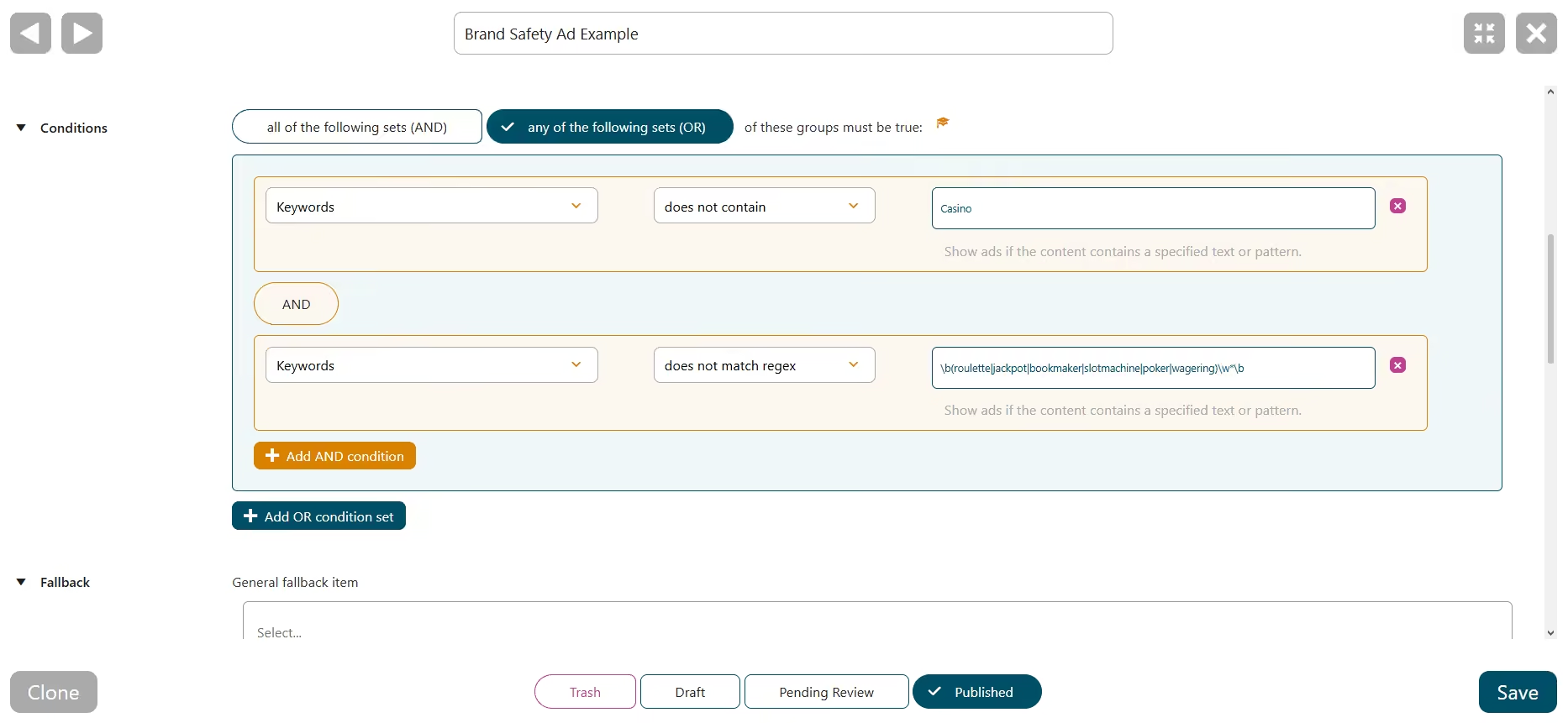
At the same time, keyword targeting should not be treated as a perfect brand safety classification system. Individual words can be misleading when taken out of context. The word “attack”, for example, could occur in an article about a military conflict, a cybersecurity incident, or a football match.
The Keyword condition is therefore best understood as a practical routing mechanism. It gives publishers control over known risk signals rather than pretending that one keyword can understand an entire article.
Sometimes you already know whether specific content is sensitive or not. This is where the Tag condition can be more precise. Publishers can assign a specific WordPress tag to content that requires special advertising treatment and then use that tag in AdPresso to control which ads appear.
For example, you could create a tag such as sensitive-content and apply it to articles that should not receive certain premium campaigns. AdPresso can then use that classification when deciding whether the relevant ad should render.
This approach has an important advantage: the classification does not depend on individual words appearing in the article. Your editorial workflow makes the decision once, and the advertising setup follows it without requiring you to maintain a large keyword list.
Sometimes the problem is not an individual article, but an entire section of your website.
A publisher might have a dedicated category covering crime, accidents, controversial political topics, or another subject where certain advertisers do not want their campaigns displayed. In this case, the Category condition is often the cleaner solution.
This is particularly useful on larger WordPress websites because the rule follows the site’s content structure. New articles assigned to the category automatically inherit the same advertising logic.
It also makes your ad setup easier to understand later. When you return to your configuration months from now, a rule targeting a clearly named category is usually much easier to maintain than a long collection of individual page exclusions.
Some pages will not fit neatly into a keyword, tag, or category rule. Perhaps one article has attracted unusual attention and contains particularly sensitive material. Perhaps a landing page discusses a controversial subject but sits outside your normal editorial taxonomy. Or perhaps you have a small number of pages that should never display a particular campaign.
For these cases, AdPresso Pro provides the Post / Page condition. This lets you exclude specific entities, ads, or placements from specific pages. It is the most direct approach because you tell AdPresso exactly which pages to exclude.
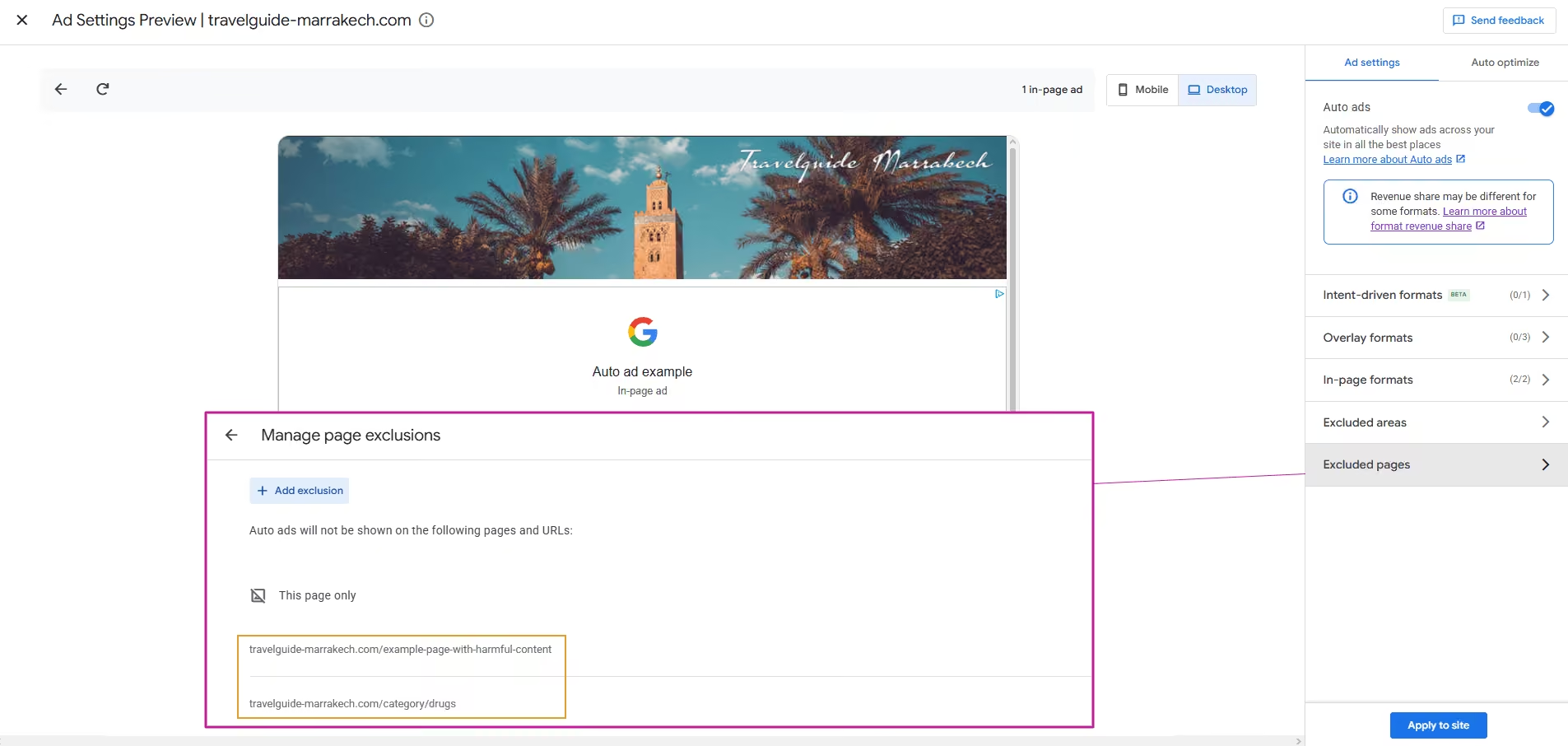
Google AdSense users have a somewhat different option when they rely on Auto Ads. AdSense lets publishers define URL exclusions for pages where they don’t want Auto Ads to appear. This can help when you have identified specific pages that shouldn’t carry AdSense ads.
There is an important trade-off, though: Auto Ads no longer monetizes an excluded URL. You are essentially telling Google not to place advertising there at all. That makes URL exclusions a useful workaround for publishers who want to keep certain pages completely free of AdSense ads, but it is not the same as granular ad targeting.
With AdPresso, you can exclude specific ads or ad groups while keeping the placement available for other advertising. This means a page can remain part of your monetization strategy even when a campaign isn’t appropriate for its content.
One more part of the setup is easy to overlook. Suppose a premium campaign is excluded because a page contains sensitive content. If the placement disappears, you have solved the brand safety problem, but you have also created an empty advertising slot.
This is where fallback ads become useful. AdPresso can use fallback logic to serve an alternative creative when the primary ad cannot be displayed. Fallback ads are designed precisely for situations where the normal ad delivery path fails or is prevented by a condition.
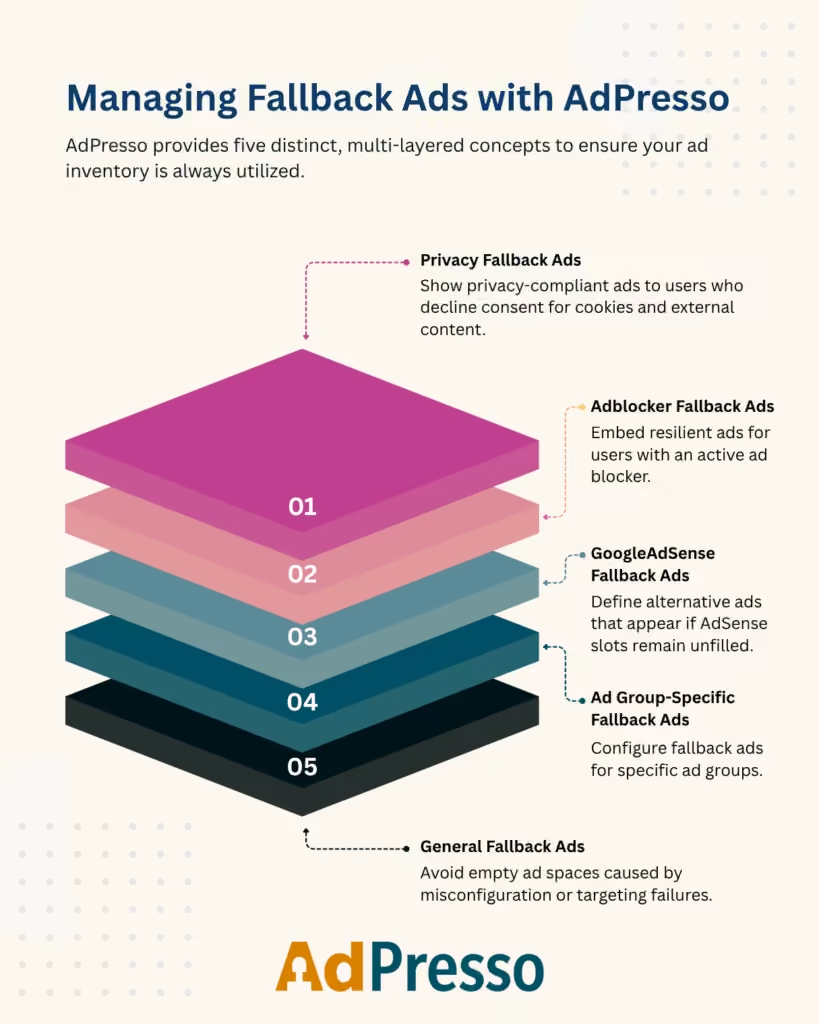
The fallback does not have to be another programmatic campaign. In many cases, an internal promotion is more appropriate. You could promote a newsletter, a subscription, another section of your website, or a lead-generation offer. Affiliate promotions can also be an option where they fit the site’s business model.
The important point is that the fallback should itself be appropriate for the page. If a page has been classified as unsuitable for a particular advertiser because of its subject matter, replacing that advertiser with another campaign with the same sensitivity problem doesn’t solve anything.