If you want to make money with affiliate marketing, it’s hard to ignore Amazon. The Amazon Associates program is massive, converts extremely well, and gives publishers access to millions of products across almost every niche imaginable.
At the same time, Amazon affiliate links are notoriously messy. Product URLs often contain endless tracking parameters, campaign tags, referral IDs, and additional metadata that make links look bloated and untrustworthy.
That’s exactly why so many affiliates search for ways to shorten Amazon link structures, use branded redirects, or implement link masking.
With most affiliate networks, turning a raw tracking URL into something cleaner like yourdomain.com/recommends/product-name is considered standard practice. But Amazon plays by slightly different rules. A masking setup that works perfectly well for another affiliate program can become a compliance issue within the Amazon ecosystem.
That’s why understanding the difference between safe Amazon link shortening and risky cloaking matters so much.
In this guide, I’ll break down how to safely shorten Amazon affiliate links, which parts of the URL are essential, and which link-shortening strategies work best for long-term affiliate projects.
Before you touch your Amazon links, there are two rules you absolutely need to understand.
/amazon/product-name/, rather than generic /go/ redirects.Before discussing link masking, cloaking, or URL shorteners, it helps to understand how Amazon affiliate links work under the hood.
Most people only see the massive product URLs sitting in their browser address bar. In reality, an Amazon affiliate link only needs a few core components to function properly.
A standard Amazon affiliate link usually contains three important elements:
A simplified Amazon affiliate link often looks like this: https://www.amazon.com/dp/ASIN/?tag=YOUR-ASSOCIATE-ID
This structure is already much cleaner than the extremely long URLs Amazon often generates automatically inside the browser.
In other words, many affiliates technically don’t need a dedicated Amazon URL shortener at all. Simply understanding which URL components matter already allows you to create significantly cleaner links manually.
ASIN stands for “Amazon Standard Identification Number.”
Every product in Amazon’s catalog has a unique 10-character identifier. Think of it as Amazon’s internal product fingerprint.
You can usually find the ASIN:
A product URL like this: https://www.amazon.com/dp/B0CPXYZ123 already contains the ASIN: B0CPXYZ123.
That identifier is the critical part that tells Amazon which exact product should load.
The second critical element is your Amazon Associates tracking ID.
When you join Amazon, Amazon assigns you a unique tracking tag that attributes commissions to your account.
It usually looks something like this: yourwebsite-20.
Without this parameter, Amazon cannot attribute sales correctly, meaning you won’t receive affiliate commissions. The tracking parameter appears as: ?tag=yourwebsite-20.
This parameter is the actual affiliate component of the URL.
Advanced affiliates often create multiple tracking IDs inside their Associates dashboard.
This strategy is particularly useful if you operate:
Instead of using one universal tag everywhere, you can create dedicated tracking IDs for each traffic source and analyze performance separately.
For example:
This approach provides much cleaner attribution data inside your Amazon reporting dashboard and makes optimization significantly easier later on.
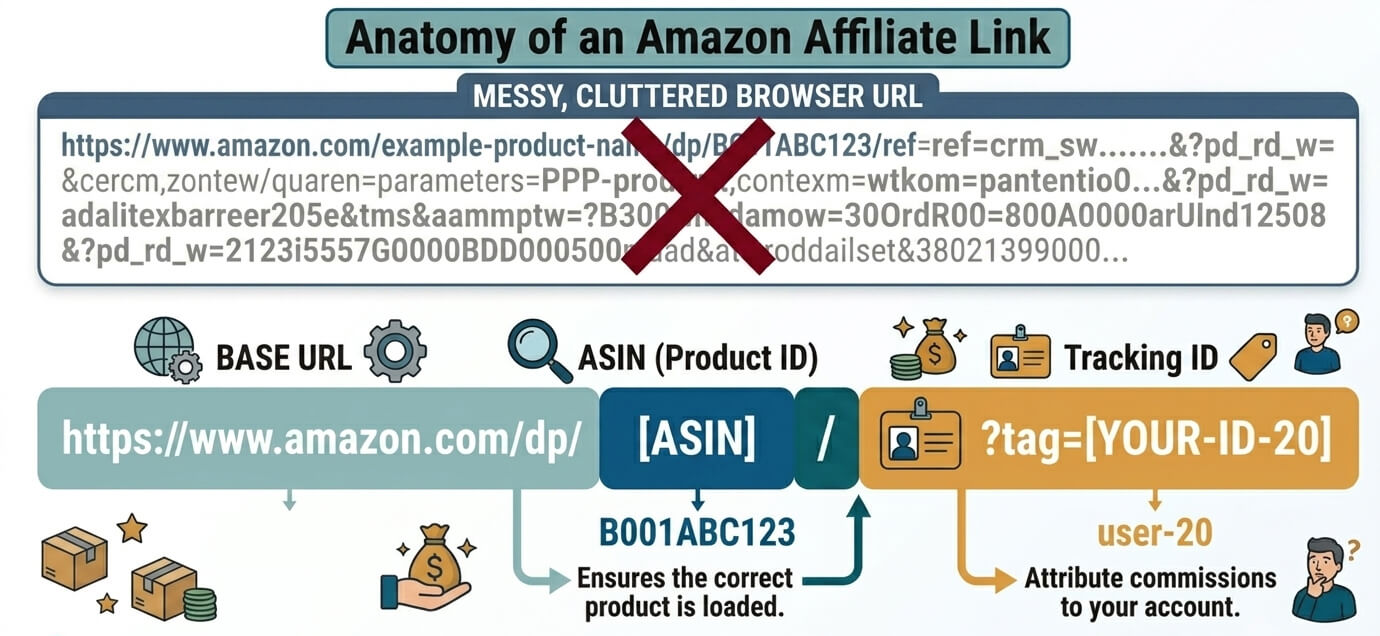
Here’s where things start getting confusing for many publishers. The URL Amazon displays in the browser is often far longer than necessary.
A raw Amazon URL may include:
That’s why product links sometimes look like complete chaos. A browser URL can easily turn into something like:
https://www.amazon.com/example-product/dp/B0CPXYZ123/ref=something_extremely_long_and_unnecessary
Most of these extra parameters are irrelevant for affiliate attribution. That’s also why experienced affiliates often choose to shorten Amazon link formats manually before even considering advanced link masking setups.
Most affiliate programs actively encourage branded redirects and shortened tracking links. Amazon takes a noticeably stricter approach. Inside the official Associates Program Policies, Amazon repeatedly emphasizes transparency, attribution, and traceability. The company does not want affiliates hiding traffic sources, disguising destinations, or creating redirect setups that make affiliate traffic difficult to audit later on.
That does not mean every shortened or branded URL automatically violates the rules. The important distinction is how the masking is implemented.
Amazon primarily cares about two conditions:
As long as both conditions remain intact, transparent link management itself is not inherently problematic. That’s also why modern affiliate setups increasingly move toward clearly labeled URL structures instead of generic redirect paths. A transparent structure like yourdomain.com/amazon/best-standing-desk creates significantly less ambiguity than something vague like yourdomain.com/go/48372.
The first immediately communicates the destination and intent. The second hides both.
This distinction becomes especially important when using WordPress affiliate plugins or automated link shorteners. That’s ultimately the safer long-term direction for Amazon affiliates.
Amazon’s rules around link masking are surprisingly direct. Inside the official Associates Program Participation Requirements, Amazon explicitly states:
“You will not cloak, hide, spoof, or otherwise obscure the URL of your Site containing Special Links [...] such that we cannot reasonably determine the site or application from which a customer clicks.”
And immediately afterward:
“You will not use a link shortening service, button, hyperlink, or other ad placement in a manner that makes it unclear that you are linking to an Amazon Site.”
In practical terms, Amazon defines two non-negotiable requirements. First, Amazon must always be able to technically identify the originating traffic source. That means the referrer chain and click attribution cannot be intentionally hidden or broken. Second, the user must clearly understand that clicking the link leads to Amazon before interacting with it.
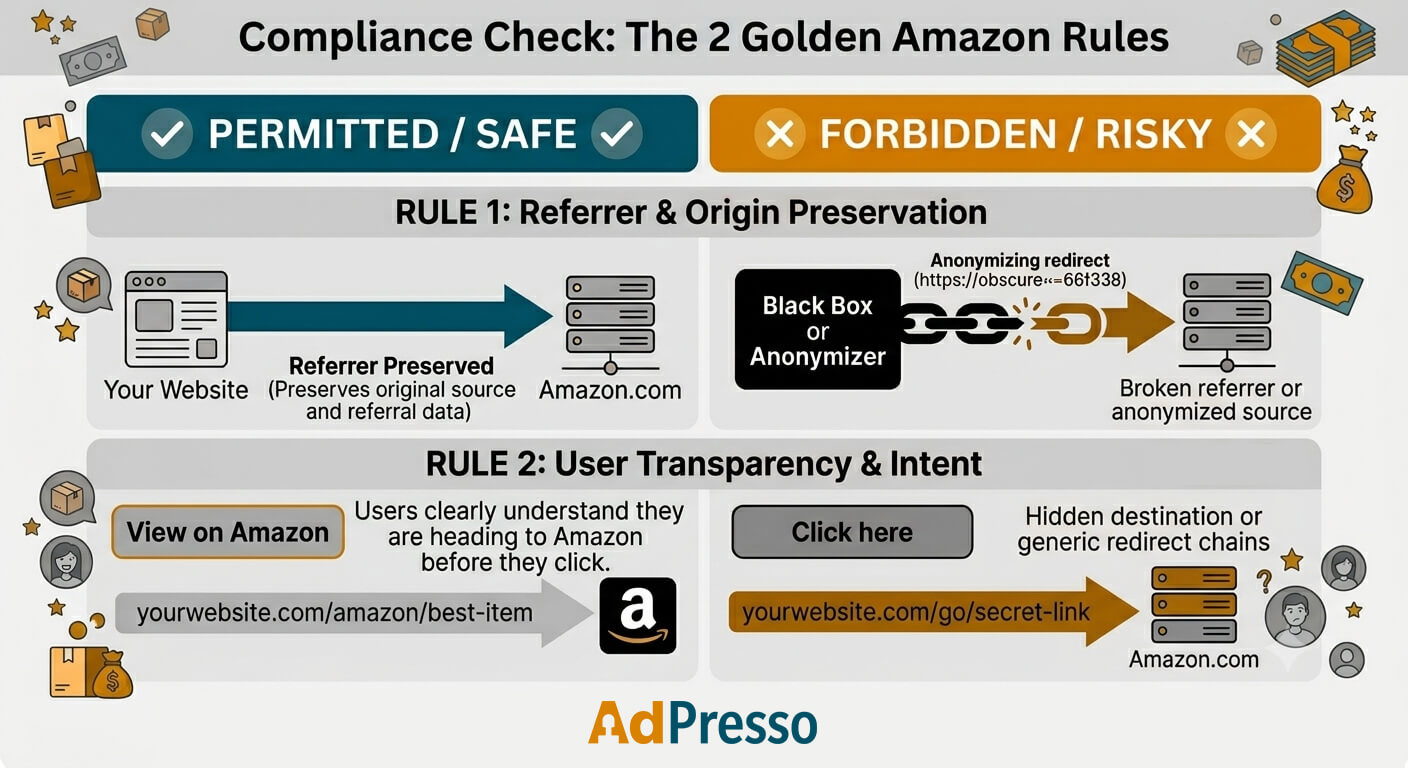
However, many old-school affiliate masking setups fail to do this. Generic redirects, aggressive cloaking plugins, JavaScript-based forwarding chains, and heavily obfuscated shortlinks can easily and unintentionally cross that line. Transparent Amazon-specific structures are generally much easier to defend from a compliance perspective because they preserve both attribution clarity and user expectations.
A well-known example inside the affiliate marketing community involved affiliate marketer Tony Teaches Tech, who publicly discussed issues after using the WordPress plugin Pretty Links together with Amazon affiliate links.
The original goal was completely understandable.
He wanted to:
The problem was not simply using Pretty Links. The larger issue appears to have been the overall implementation and traffic behavior around the setup.
According to reports discussed in affiliate communities, several factors may have contributed simultaneously:
That combination likely triggered Amazon’s fraud and compliance systems very quickly. Understanding this distinction is crucial because many online discussions oversimplify the story to “Amazon bans all masked links,” which is not entirely accurate.
The bigger takeaway is this: the more aggressively a setup obscures traffic origins or creates unnatural redirect behavior, the higher the compliance risk becomes. That’s exactly why transparent link structures, limited redirect chains, and clearly labeled Amazon destinations are generally considered the safest route today.
The consequences can be severe.
Amazon frequently withholds unpaid commissions once an account enters manual review or gets terminated. Depending on the timing, this freeze can result in the loss of weeks or even months of accumulated affiliate revenue.
Re-entering the Associates program after a permanent suspension is notoriously difficult. Amazon cross-checks:
Many banned affiliates report that follow-up applications are automatically rejected.
Amazon technically offers an appeal process, but many affiliates describe it as slow and highly opaque. Waiting periods of several weeks or even multiple months are common. In many cases, responses remain generic and provide little technical detail about the specific violation that triggered the suspension.
That uncertainty is precisely why conservative and transparent link management has become so important for long-term Amazon affiliate projects.
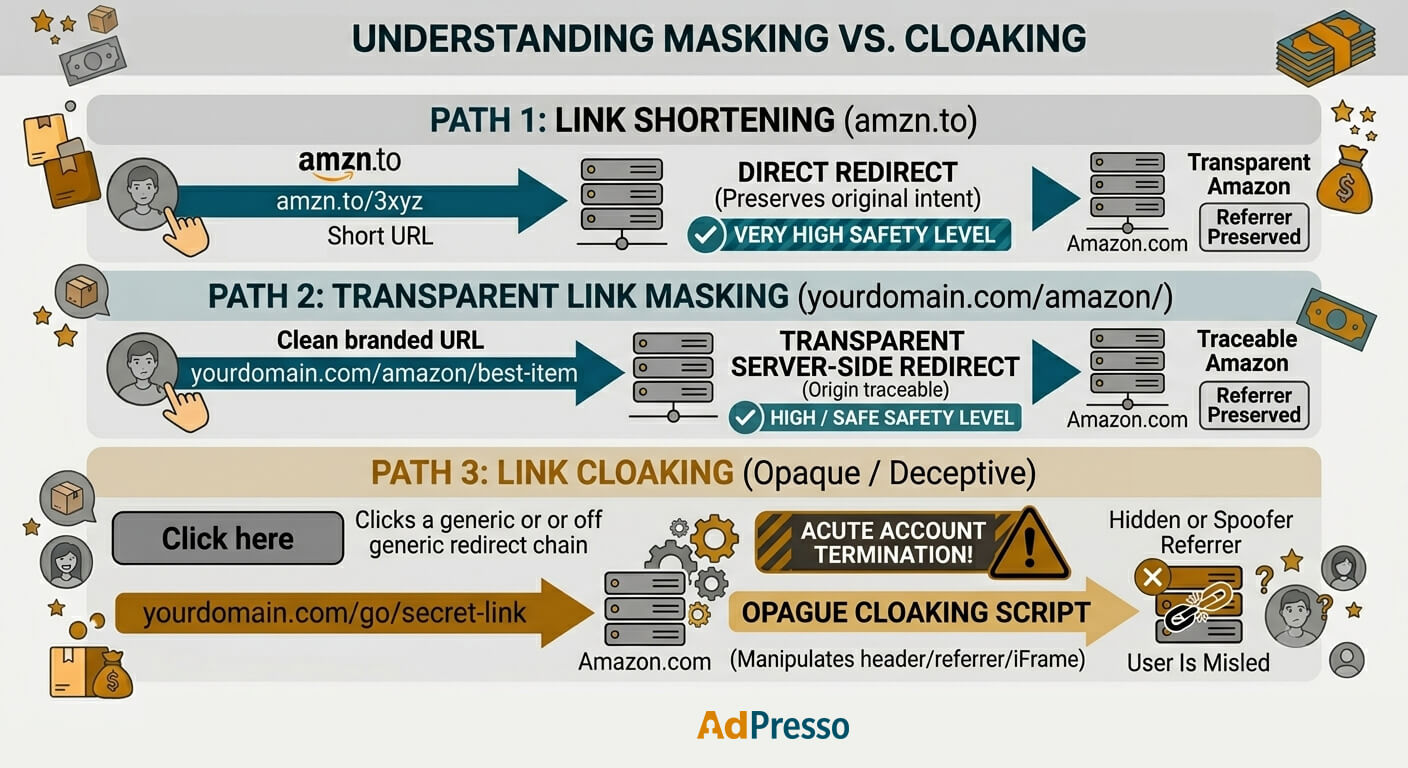
One of the most confusing parts of this entire discussion is the terminology itself. In affiliate marketing communities, terms like link shortening, link masking, and link cloaking are often conflated as if they describe the same thing. Technically, they don’t. And that distinction matters because Amazon evaluates these setups very differently depending on how the redirect infrastructure actually behaves behind the scenes.
Link shortening reduces the visible length of a URL. If you are looking for an official Amazon URL shortener, the safest and most obvious example is Amazon’s own amzn.to shortener. Because Amazon controls the redirect infrastructure itself, the company can still fully track attribution, traffic origin, and redirect behavior internally.
From Amazon’s perspective, nothing becomes ambiguous.
Generic third-party shorteners are a different story. If you use a generic third-party tool to create an Amazon tiny URL or a shortened Bitly-style link, it completely hides the destination before the click happens. Depending on the implementation, some shorteners may also interfere with referrer visibility or create additional redirect layers, making attribution less reliable.
That’s where compliance concerns start increasing.
Link masking usually means routing affiliate links through your own domain structure. Instead of exposing a long Amazon URL directly, you create a branded path like yourdomain.com/amazon/standing-desk.
When implemented transparently, this strategy mainly improves branding, usability, click trust, and centralized link management. This setup is also the preferred choice for many professional publishers, as it allows them to update affiliate destinations globally without manually replacing links across hundreds of articles.
The important part is transparency. The user still understands where the click leads, and Amazon can still correctly identify the originating traffic source.
Cloaking is where things become risky. In Amazon’s interpretation, cloaking generally means intentionally hiding or manipulating important attribution signals behind the redirect process.
This practice can include setups that:
Some aggressive redirect tools even load external destinations inside iframe-based forwarding systems while keeping the original URL visible in the browser. That moves far beyond normal link management and directly into high-risk territory.
The critical difference is intent and transparency. Clean masking improves structure and usability. Cloaking attempts to conceal behavior, destinations, or attribution.
One of the biggest misconceptions is that Amazon bans accounts simply because someone used a branded URL once. That’s usually not what happens. In most cases, the real issue is the technical implementation behind the redirects.
A common scenario looks like this:
An affiliate installs a generic redirect plugin that automatically converts every outgoing affiliate link into a shared structure, like yourdomain.com/go/product. The visitor is then routed through multiple redirect layers before reaching Amazon.
During that process, one of two major problems often appears:
At that point, Amazon’s automated fraud and compliance systems may start flagging the traffic. Many affiliates incorrectly assume Amazon will issue a warning first. In reality, affiliate communities are full of reports describing immediate account closures without prior notice. Once an account gets terminated, recovering it becomes extremely difficult. Amazon often freezes unpaid commissions, and opening a replacement account later can become complicated because the company cross-checks:
That’s exactly why conservative redirect architectures matter so much for long-term Amazon affiliate projects.
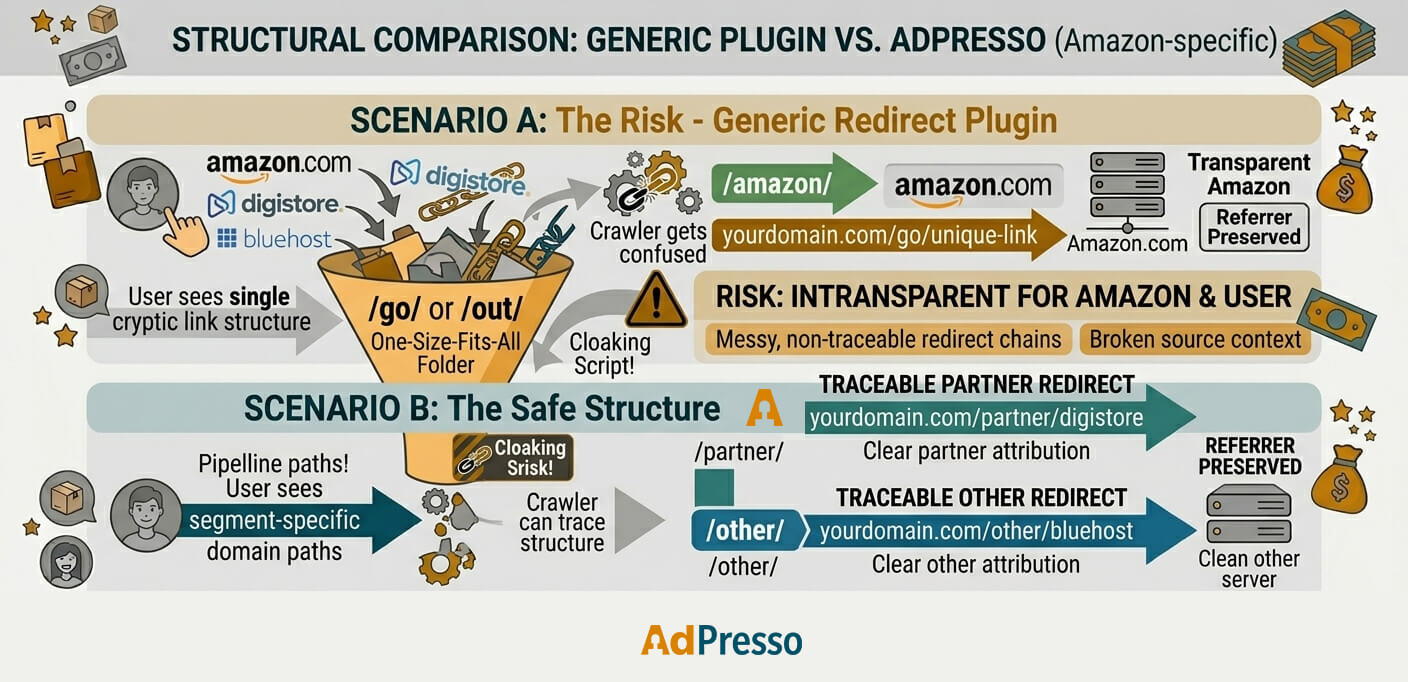
The core issue is that most WordPress redirect plugins were never specifically designed to meet Amazon’s compliance requirements. Plugins like Pretty Links or generic URL shorteners often push every affiliate network through the same redirect base:
/go//out//recommended/From a pure branding perspective, that may look perfectly clean. From Amazon’s perspective, however, it creates ambiguity. The visitor cannot immediately identify whether the destination is:
Once you combine that ambiguity with aggressive redirect chains or broken referrer handling, the setup quickly starts looking suspicious. That’s where many affiliates unintentionally drift from legitimate masking into problematic cloaking-like behavior.
Modern affiliate link management has become much more nuanced over the last few years. Not all masking structures carry the same risk profile. A transparent URL architecture behaves very differently from a generic redirect system. Instead of routing every partner network through one unclear redirect base, advanced setups separate affiliate programs structurally.
For example:
yourdomain.com/amazon/best-monitoryourdomain.com/amazon/usb-microphoneAt that point, the destination becomes obvious before the click even happens. The user immediately understands they are heading to Amazon, which directly addresses the transparency requirement that Amazon emphasizes throughout its policies. This commitment to transparency is precisely why tools like AdPresso approach link masking differently.
Rather than funneling all affiliate programs through a single shared redirect slug, the system allows publishers to create separate URL structures for different partner networks.
Not every setup carries the same risk level.
Here’s how the most common approaches compare in practice.
| Method | Branding Potential | Link Management & Analytics | Amazon Compliance Risk | Best Use Case |
|---|---|---|---|---|
| Raw Amazon URLs | Very low | Minimal | Very low | Maximum compliance with zero optimization |
| Official amzn.to shortener | Medium | Limited | Very low | Social media and quick sharing |
| Generic shorteners (Bitly, etc.) | Medium | Medium | High | Generally not recommended for Amazon |
| Standard link management plugins (/go/ redirects) | High | High | Medium | Usable, but risky when redirects become non-transparent |
| Transparent Amazon-specific masking with AdPresso | Very high | Very high | Low | Best balance between branding, scalability, analytics, and transparency |
Most beginners start with this default approach. You copy the full affiliate URL directly from Amazon’s SiteStripe or the browser address bar and paste it into your content unchanged.
A typical example looks like this: https://www.amazon.com/dp/B0CPXYZ123/?tag=yourwebsite-20.
From a compliance perspective, using raw links is extremely safe. Amazon sees the full referral path; the destination remains completely transparent, and no redirect infrastructure is involved that could accidentally interfere with attribution.
The downside is usability. Raw Amazon links are often excessively long, visually messy, and difficult to manage at scale. They also look less trustworthy when displayed openly inside articles, newsletters, or social media posts.
Amazon provides its own built-in shortening system through the SiteStripe toolbar. Instead of a long product URL, you receive a compact link like https://amzn.to/3xyz123.
This is one of the safest shortening methods available because Amazon controls the entire redirect infrastructure itself.
The platform fully understands:
Users also immediately recognize the amzn.to format as an Amazon-owned link, which preserves transparency.
The main limitation is flexibility. You do not get branded URLs, advanced analytics, or centralized link management capabilities across your own domain structure. Still, for social media posts, YouTube descriptions, or quick affiliate sharing, amzn.to remains one of the safest plug-and-play solutions available.
Using these tools introduces significantly more nuance in compliance. Plugins like Pretty Links and ThirstyAffiliates, as well as generic shorteners like Bitly, primarily focus on link branding and centralized redirect management.
Instead of exposing a raw Amazon URL, they generate cleaner structures such as yourdomain.com/go/amazon-product.
From a usability perspective, that looks significantly cleaner. The problem is that most of these tools were never specifically designed around Amazon’s transparency requirements.
In many setups, the redirect slug remains globally shared across all affiliate networks:
/go//out//recommended/This shared structure creates ambiguity, as users cannot immediately identify whether the link points to Amazon, another retailer, or an entirely unrelated destination.
Things become even riskier once the redirect is set up:
It is technically possible to configure some redirect plugins more safely and transparently. For example, affiliates sometimes combine branded redirects with highly visible labels such as:
That improves transparency significantly. Still, the margin for configuration errors remains relatively high, especially when multiple plugins, caching layers, or tracking tools interact.
A more advanced approach separates Amazon structurally from other affiliate programs. Instead of routing everything through a single generic redirect base, the URL architecture itself clearly communicates the destination.
For example:
yourdomain.com/amazon/423423.
This approach solves several problems simultaneously. The user immediately understands the destination before clicking.
At the same time, publishers still retain the advantages of professional link management:
This distinction is what sets AdPresso apart from traditional redirect plugins. Instead of forcing all affiliate programs into one shared slug structure, the system allows separate URL architectures for different partner networks. This feature enables transparent Amazon-specific masking without resorting to deceptive cloaking.
From a long-term compliance perspective, this strategy achieves the ideal balance between branding, scalability, analytics, and Amazon’s strict transparency requirements.
A simple mental check solves most compliance questions instantly.
Ask yourself: “Could a normal user reasonably be surprised to land on Amazon after clicking this link?”
If the answer is yes, your setup is probably risky.
If the answer is no because the destination is clearly communicated through labels, branding, context, or URL structure, you are operating much closer to Amazon’s intended transparency standards.
That’s the difference between professional link management and dangerous cloaking.
If you want the branding and management advantages of masked URLs without creating compliance issues, focus on operational clarity rather than aggressive obfuscation.
A few principles matter more than everything else combined:
The last point is especially important.
Social platforms sometimes alter redirect behavior or unpredictably strip tracking information. That makes official Amazon shortlinks much safer for platforms like X, Facebook, Pinterest, or Instagram.
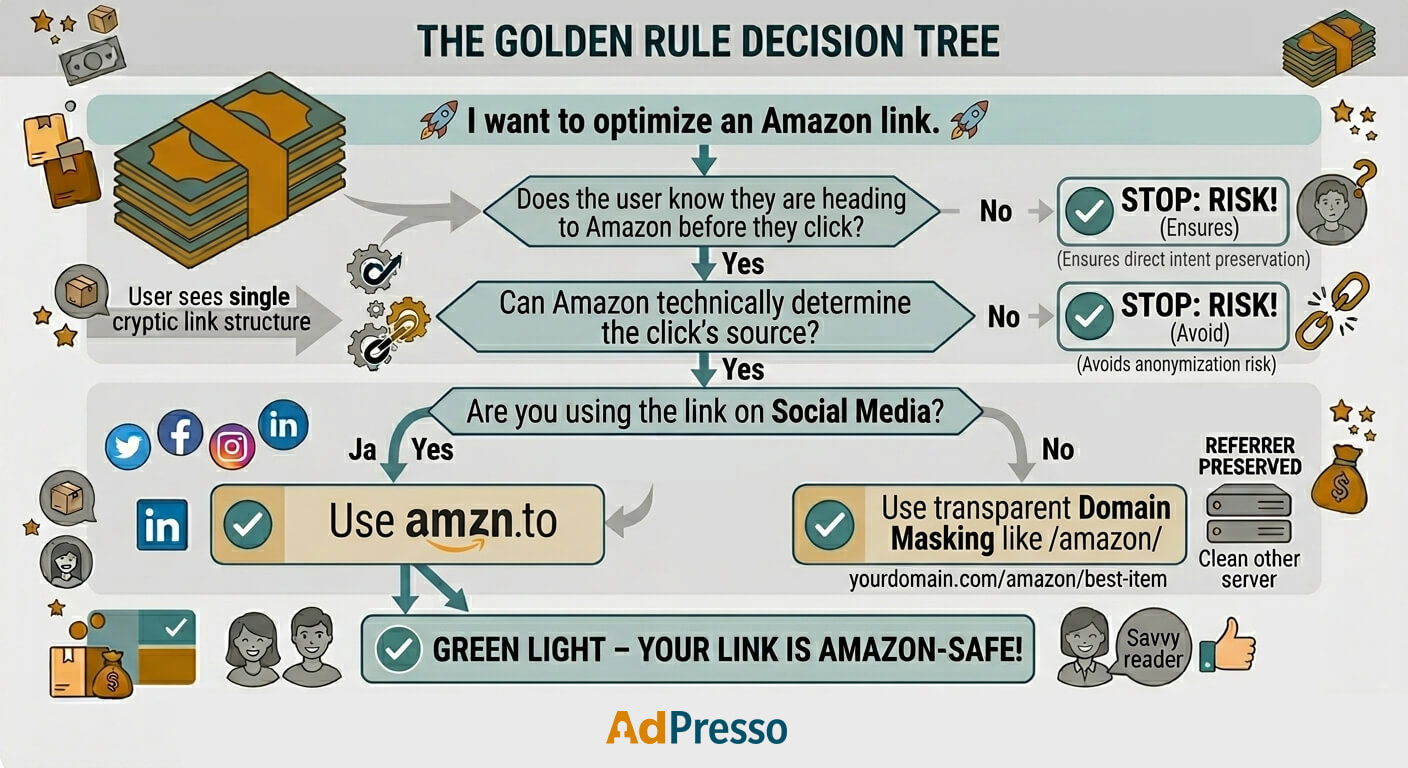
The safest way to shorten Amazon affiliate links is by using Amazon’s official amzn.to shorten or create transparent branded URLs like yourdomain.com/amazon/product-name. Plugins like AdPresso help create Amazon-specific URL structures that stay transparent while improving branding, analytics, and centralized link management.
Yes, but Amazon still needs to understand where the traffic originates from. For social media distribution, the safest option is usually Amazon’s official amzn.to shortener as Amazon fully supports it inside the Associates ecosystem. If you use custom masked links, it is generally better to keep them on your own website rather than pushing them directly to external platforms, where redirect behavior may change unexpectedly.
Not necessarily. The critical factor is transparency. If users clearly understand they are heading to Amazon and Amazon can still properly track the traffic source, transparent masking structures can operate safely. Problems usually begin when redirects hide destinations, damage referrer data, or behave like cloaking systems.
The safest overall approach is either direct Amazon links or Amazon’s official amzn.to shortener, or transparent branded URLs that explicitly indicate Amazon as the destination. A structure like yourdomain.com/amazon/product-name is significantly safer than vague redirect paths like /go/product123.