Server-side link masking intercepts requests at the infrastructure level, serving complex tracking paths behind clean, branded URLs. I designed this hardcore deep dive as the definitive resource for developers and power users who demand maximum performance and want to protect revenue from "affiliate hijacking" by obscuring tracking IDs before the browser even renders the page. By bypassing high-overhead plugins, you gain total control over your link architecture directly at the server level.
However, technical control requires architectural responsibility. It is critical to distinguish between professional link masking and "cloaking." Legitimate masking serves identical content to both users and crawlers to maintain brand integrity. Cloaking—serving different versions to search engine bots—is a black-hat violation that results in permanent de-indexing.
Warning: High-Stakes Configuration Manual server manipulation is a zero-tolerance task. A single syntax error, such as a misplaced bracket in .htaccess or a missing semicolon in an NGINX block, will trigger a 500 Internal Server Error, taking your entire environment offline instantly. Always maintain a verified backup and validate configurations in a staging environment before deployment.
Before deploying server-side redirects, verify your environment can handle manual overrides, as errors at this level affect the entire request lifecycle. To safeguard your project, create a physical recovery point before making any manual edits: for example, run cp .htaccess .htaccess.bak in your terminal to ensure you can restore your site instantly if a syntax error occurs.
Because manual server manipulation is a zero-tolerance task, a verified backup of your existing configuration is mandatory to prevent a 500 Internal Server Error from taking your environment offline.
mod_rewrite. For NGINX, ensure you have sufficient permissions to reload the service (usually sudo or root access)..htaccess file (note that files starting with a dot are often hidden by default on Linux/Mac). On NGINX, you will modify the server block in your site-specific configuration file.On Apache, every masking script must begin with the following initialization:
RewriteEngine OnIn NGINX, ensure your rules are placed within a valid location or server block so the engine recognizes them.
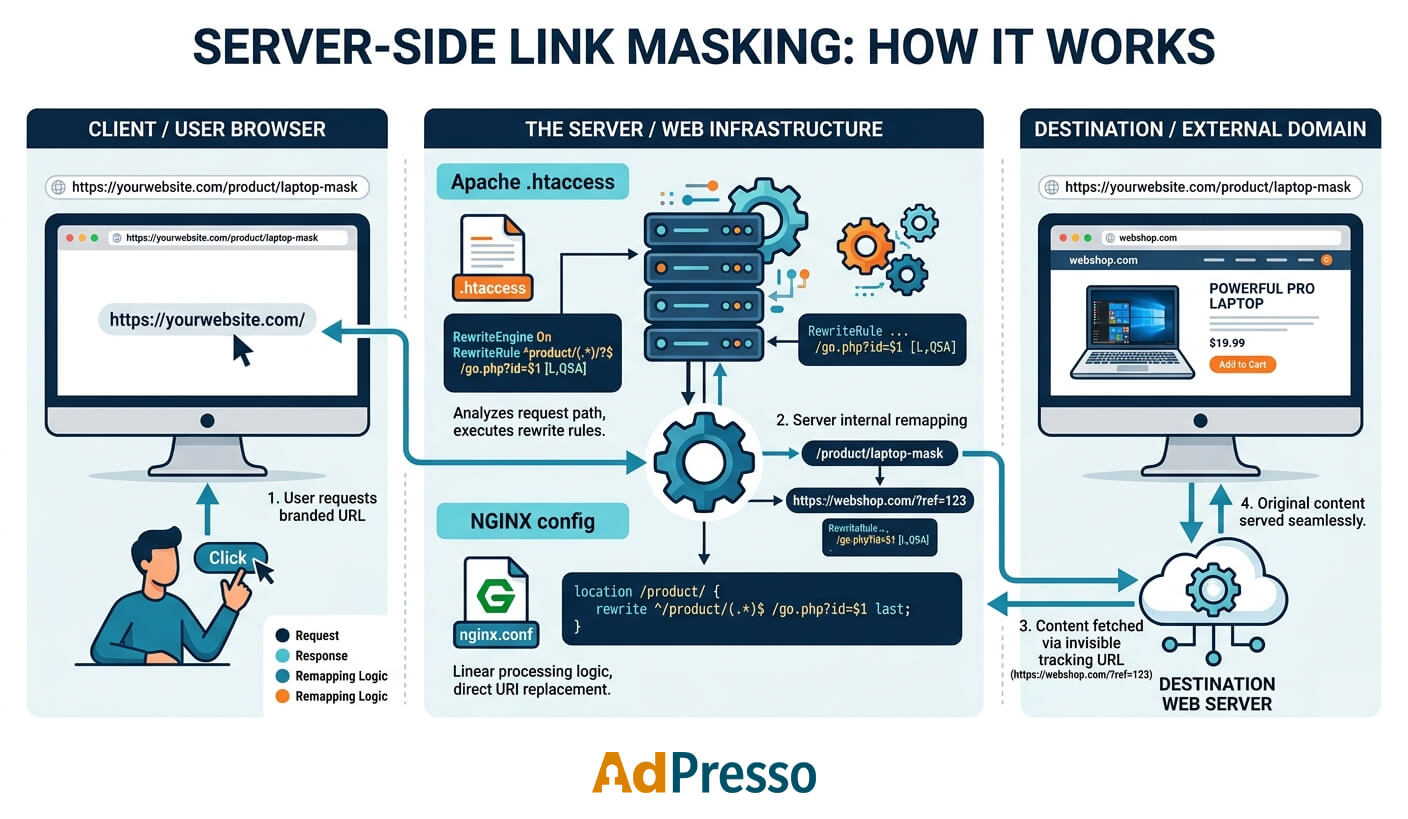
Internal rewrites are the technical foundation behind most professional link masking setups. Instead of sending the visitor elsewhere, the server quietly loads content from a different location in the background while the visible browser URL remains the same.
For the visitor, nothing appears to change. They open a clean branded URL like https://yourdomain.com/offer, and the page loads normally. Behind the scenes, however, the web server actually pulls the content from a hidden internal path such as /wp-content/private/offer.html.
The important difference is that no visible redirect happens. The browser never sees the real destination path, and no second HTTP request is triggered. Everything happens internally during the request lifecycle of the same server. This approach makes internal rewrites extremely fast, lightweight, and ideal for performance-sensitive affiliate projects where clean URLs and efficient routing matter.
Internal rewrites are commonly used for branded affiliate slugs, hidden tracking handlers, SEO-friendly URL structures, and protected landing pages. They are especially popular in WordPress environments because they allow developers to hide complex file paths behind short, readable URLs without relying on heavy redirect plugins.
A rewrite only works for resources that already exist on the same server. The server can remap internal files and scripts, but it cannot silently fetch external websites or third-party affiliate pages. As soon as external destinations are involved, the process requires redirect-based masking or reverse proxying.
| Level | Method | Primary Use Case |
|---|---|---|
| Level 1 | Static (1-to-1) | Single landing pages or fixed utility paths. |
| Level 2 | Dynamic (numeric) | E-commerce product masking or ID-based tracking. |
| Level 3 | Dynamic (slug) | Branded affiliate links and marketing campaigns. |
| Level 4 | Nested structure | Complex directories and multi-layer catalogs. |
Before implementing the specific masking levels, ensure your server environment is prepared for internal rewrites.
.htaccess)Apache handles internal masking via the mod_rewrite module. To ensure your rules are processed correctly, follow these three rules:
RewriteEngine On at the beginning of your file..htaccess file, ideally before any CMS-generated block, such as # BEGIN WordPress.NGINX approaches rewrites differently, focusing on efficiency within the server or location blocks.
last parameter. This tells the server to stop processing the current rewrite set and restart location matching with the new URI, similar to Apache’s [L] flag./go, you can add this normalization block:location = /go {
return 301 $scheme://$host$request_uri/;
}Level 1 focuses on static URL masking, which creates a direct one-to-one relationship between a public link and an internal resource. In this scenario, you map a single user-friendly URL to one specific hidden file on your server. This method is the perfect choice for permanent landing pages or fixed tracking points where the structure does not need to change.
For instance, you can present a professional link like yourdomain.com/blackfriday to the world, while the server quietly handles the request by serving a deeply nested file such as /assets/campaigns/landing-page-v2.html.
For Apache servers, you typically use the RewriteRule directive within your .htaccess file.
# Static Internal Rewrite

RewriteRule ^offer/?$ /wp-content/private/offer.html [L]^offer/?$: Matches the exact request path for "offer". The ^ symbol marks the beginning of the request, while the $ sign signifies the end. The /? part makes the trailing slash optional for the visitor.[L] Flag: This stands for the "Last Rule" flag. It instructs Apache to stop processing any further rewrite rules once a match is found.The destination file must physically exist on the server. If the file is located at /wp-content/private/offer.html is missing, Apache will return an 404 Not Found error even if the rewrite syntax itself is perfectly valid.
In an NGINX environment, the rewrite logic is handled within the server or the location block of your configuration file.
# Static Internal Rewrite

rewrite ^/offer/?$ /wp-content/private/offer.html last;rewrite: The standard directive for internal URL manipulation in NGINX.last: This parameter functions similarly to the Apache [L] flag. It tells NGINX to finish the current rewrite processing and start a new search for a location block that matches the newly rewritten URI.Regex-based rewrites allow a single rule to handle hundreds or thousands of dynamic URLs. This is particularly useful for e-commerce or large affiliate sites where you want to mask database-driven paths, such as transforming /product/123 into the internal path /shop.php?pid=123.
This approach is popular for affiliate tracking and sophisticated analytics attribution. By using capture groups, you maintain a clean, professional URL structure for users while providing your backend scripts with the necessary data to track conversions and manage content dynamically.
It eliminates the need to manually create a new rewrite rule for each product or landing page, making your server configuration scalable and easier to maintain.
For Apache, we use a capture group to grab the ID from the URL and pass it to the internal script.
# Dynamic ID: /product/123 -> /shop.php?pid=123

RewriteRule ^product/([0-9]+)/?$ /shop.php?pid=$1 [L,QSA]([0-9]+): This is a capture group that matches one or more digits. The matched value is temporarily stored and then injected into the target path as $1.[QSA] Flag: This stands for "Query String Append". It ensures that existing URL parameters, such as UTM tracking codes, are preserved and appended to the internal request rather than overwritten.In NGINX, dynamic rewrites use a similar logic but different syntax for variables and flags.
# Dynamic ID: /product/123 -> /shop.php?pid=123

rewrite ^/product/([0-9]+)/?$ /shop.php?pid=$1 last;$1 Variable: Just like in Apache, the parentheses in the regular expression capture the numeric ID. In the second half of the directive, $1 places that captured the number into the query parameter./product/123?source=ppc, NGINX automatically processes it as /shop.php?pid=123&source=ppc without needing an extra flag.While numeric IDs are efficient for databases, public-facing links should be descriptive and keyword-rich to maximize trust and SEO value. Level 3 uses "slugs"—readable strings of text—to create clean, branded paths like /go/amazon-deal, which the server then maps to an internal handler such as /system/tracker.php?slug=amazon-deal.
For local server-side masking, these internal rewrites remain the fastest solution because the entire request lifecycle stays within the same environment. By using Level 3, you combine this technical speed with a high-end user experience, as visitors only ever see your professional, branded URLs.
In Apache, we use a specific character class to ensure the rewrite only triggers for valid URL slugs.
# SEO-Friendly Slug Rewrite

RewriteRule ^go/([a-zA-Z0-9_-]+)/?$ /system/tracker.php?slug=$1 [L,QSA]([a-zA-Z0-9_-]+): This capture group is more refined than a simple digit match. It looks for any combination of upper and lowercase letters, numbers, hyphens, and underscores.(.*), as it prevents the rule from accidentally matching unrelated paths or system files./go/name format.NGINX handles slug-based rewrites using the same logic but with its distinct syntax for variables.
# SEO-Friendly Slug Rewrite

rewrite ^/go/([a-zA-Z0-9_-]+)/?$ /system/tracker.php?slug=$1 last;([a-zA-Z0-9_-]+) works the same way here, capturing the descriptive part of the URL (e.g., "amazon-deal").$1 variable, allowing your backend to look up the destination by name rather than a numeric ID.For complex authority sites or review portals, a single variable is often not enough. Level 4 allows you to mask multiple logical layers within the URL, such as a category and a specific product. This creates a scalable hierarchy without the need to define new routes for every page manually.
A common example is a review directory where the server maps a public URL like /reviews/software/vpn to /internal/engine.php?category=software&product=vpn. This schema is particularly valuable for comparison portals, affiliate databases, and large product catalogs.
In Apache, we use multiple capture groups to identify the different segments of the URL path.
# Nested Category Rewrite

RewriteRule ^reviews/([^/]+)/([^/]+)/?$ /internal/engine.php?category=$1&product=$2 [L,QSA]
Technical breakdown
([^/]+): This specific pattern matches every character except for a forward slash. This ensures that the rewrite engine correctly identifies where one category ends and the next sub-path begins.$1, and the second segment (e.g., "vpn") becomes $2. These are then injected into the internal query string.NGINX handles multi-layered paths with a very clean syntax, using the same regular expression logic to capture the variables.
# Nested Category Rewrite

rewrite ^/reviews/([^/]+)/([^/]+)/?$ /internal/engine.php?category=$1&product=$2 last;$1 and $2 based on their order in the path.To avoid common pitfalls like the 500 Internal Server Error or persistent caching issues, I recommend following a systematic deployment sequence. This ensures that your masking rules work as intended without disrupting your site's availability.
Before uploading any changes, always verify your code. For Apache, you can use online tools like htaccesscheck.net or run apachectl configtest if you have terminal access. NGINX users should always perform an nginx -t to ensure the configuration file is valid before reloading the service.
Once the rules are live, test the URL via the command line to ensure the server returns the correct status code without exposing the internal path. Using a command like curl -I https://your-domain.com/masked-slug lets you see exactly what the server sends to the browser before any redirects or masking occur.
Caching is the most common cause of 'false-negative' tests and 'broken' rewrites. If your infrastructure uses LiteSpeed, Varnish, or Cloudflare, you must perform a Purge All after every deployment. On the client side, always test in Incognito Mode and use a Hard Refresh (Ctrl+F5) to bypass your local browser cache and ensure you are not viewing a stale, cached version of your rules.
After deployment, keep an eye on your server's error logs. Monitoring the Apache error_log or NGINX error.log will help you identify hidden regressions or 404 errors that might not be immediately visible during manual browser testing.
Whether you are using Apache or NGINX, manual server-level masking is a powerful but high-risk strategy. Before proceeding to the NGINX implementation, consider these universal technical trade-offs:
500 Internal Server Error, taking your entire environment offline instantly..htaccess parsing, every complex Regex rule still requires CPU cycles. A bloated configuration file can add measurable latency (50 ms+) to every request, including images and scripts, which impacts your overall Core Web Vitals.Most engineers begin with manual edits to master the underlying mechanics, but eventually migrate to AdPresso. It offers the same high-performance, server-level execution but adds a fail-safe UI, automated syntax validation, and integrated analytics. This eliminates the risk of catastrophic downtime while providing the marketing intelligence needed to scale.
Unlike internal rewrites, which happen silently on the server, a redirect actively instructs the visitor's browser to load a different destination. From a technical standpoint, this means the browser performs a completely new HTTP request to reach the target page.
In most cases, the visible URL in the browser's address bar changes to the final destination once the process is complete. This method is the industry standard for affiliate marketing because it allows you to drive traffic to external stores or third-party platforms without hosting or mirroring their content on your own server.
Redirect-based masking is the ideal choice for affiliate forwarding, click attribution in advertising campaigns, or geo-targeting, where users are sent to different landing pages based on their location. Since no proxying is required, the impact on your server's resources remains minimal.
Conditional redirects allow you to execute a rule only under specific circumstances. You can think of this as IF-THEN logic for your web traffic. This gives you the flexibility to decide whether to redirect a user based on their origin, device, or language settings.
At this stage, link masking becomes more dynamic. Instead of redirecting every visitor the same way, conditional redirects allow the server to make decisions before forwarding the request. In practice, this creates an IF-THEN logic layer directly inside your web server configuration.
This technique is widely used in affiliate marketing, advertising funnels, geo-targeting systems, and campaign segmentation workflows. Rather than sending all traffic to a single destination, the server can evaluate specific request data first and only trigger the redirect when certain conditions are met.
A common example is social traffic routing. Visitors arriving from Facebook may be forwarded to a dedicated landing page optimized for paid traffic, while direct visitors continue to see the normal website experience. You can also apply the same principle to language detection, mobile devices, traffic sources, and campaign tracking.
Because the logic runs before your application even loads, conditional redirects are extremely fast and place very little load on the server.
Apache handles the conditional logic with the RewriteCond directive. You can think of it as a filter that must evaluate as "true" before the redirect rule is executed.
In the following example, the redirect only activates when the visitor arrives from Facebook.
# Redirect ONLY if visitor arrives from Facebook

RewriteCond %{HTTP_REFERER} ^https://(www\.)?facebook\.com [NC]

RewriteRule ^secret-deal/?$ https://affiliate-network.com/tracker?id=42 [R=302,L]RewriteCond %{HTTP_REFERER}: This directive inspects the HTTP Referer header sent by the browser. It tells Apache where the visitor originally came from.^https://(www\.)?facebook\.com: This regular expression matches official Facebook domains and also accepts optional variations such as www.facebook.com.[NC]: Short for "No Case". It makes the match case-insensitive, ensuring that uppercase or mixed-case variations still trigger correctly.[R=302,L]: R=302 sends a temporary redirect response to the browser. L stands for "Last Rule" and tells Apache to stop processing additional rewrite rules once the redirect has fired.The use of a temporary redirect is important here. Campaign-specific routing logic often changes over time, making a 302 redirect safer than a permanent 301 redirect.
NGINX approaches conditional redirects differently because it does not use .htaccess files. All logic is defined directly inside the server configuration, usually within /etc/nginx/sites-available/.
For simple traffic-based conditions, NGINX commonly uses an if block together with either a return or rewrite directive.
# Redirect ONLY if visitor arrives from Facebook

if ($http_referer ~* "facebook\.com") {

   return 302 https://affiliate-network.com/tracker?id=42;

}$http_referer: This built-in NGINX variable retrieves the Referer header sent by the browser.~* "facebook\.com": The ~* operator performs a case-insensitive regex match. This allows the condition to automatically recognize different capitalization variants.return 302: This immediately sends a temporary redirect response to the browser. In NGINX, return is generally faster and cleaner than rewrite for straightforward redirects because it avoids additional URI processing.Both directives can perform redirects, but they serve different purposes. For simple static redirects, return is usually the best choice.
return 302 https://example.com;This approach is faster, easier to read, and more efficient under high traffic loads. rewrite, on the other hand, becomes useful when you need regex-based URL transformations or dynamic path handling.
rewrite ^/promo/(.*)$ https://affiliate-network.com/$1 redirect;This allows NGINX to capture parts of the incoming URL and dynamically inject them into the destination. As a rule of thumb, use return whenever the target URL is fixed and use rewrite only when pattern matching is required.
One major advantage of NGINX redirects is access to powerful built-in variables that can dynamically enrich affiliate URLs or tracking endpoints.
| Variable | Purpose |
|---|---|
$remote_addr | Visitor IP address |
$http_user_agent | Browser and device information |
$scheme | Detects HTTP or HTTPS |
$host | Current domain name |
$request_uri | Full original request path |
These variables are frequently used for geo-targeting, fraud detection, campaign attribution, device routing, and advanced analytics pipelines.
Example:
location = /exclusive-deal {

   return 302 https://affiliate-target.com/track?subid=$remote_addr;

}
In this case, the visitor's IP address is automatically attached to the affiliate tracking URL before the redirect occurs.
While conditional redirects are extremely flexible, modern privacy technology has made them less reliable than they once were. Browsers, VPN services, ad blockers, and privacy extensions increasingly strip or manipulate headers, such as Referer, in order to reduce user tracking. As a result, the server may no longer receive accurate origin information.
This means conditional redirects should never be treated as a security mechanism or access-control system. They work best as a supplemental routing layer for marketing optimization, campaign segmentation, or analytics enrichment. A robust redirect architecture should always include a safe fallback path in case the expected header is missing or blocked entirely.
Redirect-based masking is operationally simple, highly scalable, and extremely efficient for external affiliate forwarding. It works particularly well for campaign routing, affiliate attribution, click tracking, and traffic segmentation. However, this approach also introduces several important trade-offs.
Unlike internal rewrites, redirects always trigger an additional HTTP request because the browser must leave the current URL and request a new destination page. This adds extra latency and slightly increases Time to First Byte (TTFB).
Another limitation is visibility. Once the redirect finishes, the visitor typically sees the final destination URL in the browser address bar. This can expose affiliate parameters, tracking IDs, or partner domains, increasing the risk of manual URL manipulation or affiliate hijacking.
Finally, server-level redirects provide very little built-in observability. Without additional infrastructure, you do not automatically receive dashboards, attribution reports, broken-link monitoring, or advanced audience analytics.
| Legitimate Usage (safe optimization) | Dangerous Usage (cloaking risk) |
|---|---|
| Redirecting campaign traffic: Sending users to specific landing pages based on the marketing source. | Content manipulation: Serving different content to search engine crawlers than what human users see. |
| Language targeting: Automatically masking paths to match a visitor's browser language. | Bot vs. human logic: Attempting to hide affiliate bridges from bots while showing them to humans. |
| Device optimization: Rewriting URLs to serve mobile-optimized versions of a page. | Deceptive masking: Using high-level masking to misrepresent the destination's primary intent to search engines. |
| Analytics segmentation: Masking URLs to clean up data in tracking tools and dashboards. | SEO consequences: Engaging in these behaviors (known as "cloaking") can trigger manual penalties or full de-indexing. |
Reverse proxy masking is the most advanced form of server-side link manipulation. Often referred to as the "Black Belt" of link masking, it allows the browser to remain on your domain while displaying content from a different server.
Unlike a redirect, which causes the browser to leave your site, a reverse proxy instructs your server to act as a middleman. Your infrastructure fetches the external content in the background and streams it directly to the visitor. To the user, the address bar never changes. They see yourdomain.com/partner, but they are actually interacting with external-partner.com.
This method is primarily used when maintaining a fully branded, white-label experience is critical. It prevents affiliate hijacking and preserves domain authority, but it comes with significantly higher technical overhead and infrastructure requirements.
Apache performs reverse proxying through a combination of mod_proxy and mod_rewrite. While capable, it is generally less efficient than NGINX under heavy traffic loads.
This configuration requires mod_proxy and mod_proxy_http to be enabled on your server.
# Requires SSLProxyEngine for HTTPS destinations

SSLProxyEngine On

RewriteRule ^partner/(.*)$ https://external-partner.com/$1 [P,L]SSLProxyEngine On: This is mandatory when proxying HTTPS destinations. Without it, Apache cannot establish a secure connection to the upstream server.[P] Flag: This stands for "Proxy." Instead of redirecting the browser, Apache internally fetches the remote content. The browser URL remains unchanged..htaccess file often results in an immediate 500 Internal Server Error.NGINX was natively designed as a high-performance reverse proxy. It is generally faster, more stable, and more scalable than Apache for this specific task.
The goal of this setup is to silently load content from an external partner while keeping your original URL visible.
location /partner-portal/ {

    proxy_pass https://external-partner.com/;

    proxy_set_header Host $proxy_host;

    proxy_set_header X-Real-IP $remote_addr;

    proxy_set_header X-Forwarded-For $proxy_add_x_forwarded_for;

    proxy_set_header X-Forwarded-Proto $scheme;

}proxy_pass: This is the core directive. NGINX fetches the remote content and streams it back. To the browser, the content appears to originate from your domain./partner-portal/page.html becomes external-partner.com/page.html. Without the slash, the original path is preserved. This is one of the most common causes of broken proxy configurations.$proxy_host ensures the destination server receives the hostname it expects. Some platforms may reject the request if you send your own domain via $host instead.X-Forwarded-For and X-Real-IP are essential for passing the visitor's true IP to the destination. Without these, all traffic appears to originate from your own server, which breaks analytics and fraud detection.Be extremely careful with the trailing slash in the proxy_pass directive. Adding or omitting it fundamentally changes how NGINX maps the URI to the upstream server, a common cause of broken proxy configurations.
Reverse proxying creates a seamless user experience, but it introduces three major operational challenges that every developer must prepare for.
Your site’s speed is now tethered to the destination's speed. If the partner site experiences lag, your Time to First Byte will skyrocket, as your server must wait for the remote data before it can respond to the visitor.
Your server is no longer just "pointing" users elsewhere; it is processing every single byte of traffic for the destination site. High-traffic affiliate links can quickly saturate your bandwidth and CPU.
If the destination site uses relative paths for images or scripts (e.g., <img src="/logo.png">), the browser will try to load them from your server, resulting in broken images. Solving this requires complex content rewriting with tools like NGINX's sub_filter or Apache's mod_proxy_html, which adds additional processing overhead.
Implementing a reverse proxy requires a more disciplined approach to server management than standard redirects. Because the server acts as an active intermediary, how you apply and test your configuration directly affects the stability of your entire domain.
The structural differences between server environments dictate how you should approach updates. In many Apache setups, .htaccess errors are isolated to the affected directory, though some hosting environments may impact the entire application. NGINX operates differently because it compiles the configuration into memory. A single syntax error anywhere in the config will prevent the entire service from restarting or reloading. To avoid a total site outage, you must always run the nginx -t command to validate your files before you attempt to apply any changes.
When you are ready to make your masking rules live, the method you choose to update the service is vital for user experience. Performing a full restart of the NGINX service drops all current connections, which can interrupt active downloads or user sessions. Instead, you should use the systemctl reload nginx command. This process instructs the server to spawn new worker processes with the updated configuration while allowing the old ones to finish their existing tasks gracefully.
One of the most common issues with reverse proxying is the appearance of "broken" pages where styles, scripts, or images fail to load. This phenomenon occurs because the source site often uses relative internal paths that your server cannot resolve automatically.
Your server needs to rewrite every internal link on the fly before forwarding the request, or the browser will try to load the external site's files from your own domain.
If the external site points to /style.css, the browser will search for that file at yourdomain.com/style.css rather than the partner's actual domain. Resolving this requires careful attention to URI mapping—the process of translating one path to another—or the implementation of additional filters to rewrite those internal URLs during the request lifecycle.
systemctl reload nginx instead of a full restart to apply changes without dropping active visitor connections.| Method | Best For | URL Behavior | Complexity |
|---|---|---|---|
| Internal rewrites | Local files | Hidden path | Moderate |
| Redirects | External affiliate links | URL changes | Low |
| Reverse proxy | White-labeling & SaaS | True masking | Very high |
Manual masking requires total control over invisible HTTP headers. Mistakes in this area lead directly to de-indexing, security vulnerabilities, or severe performance bottlenecks. To run a professional masking setup, you must account for how search engines and servers interact with your rules.
Masking, especially via reverse proxy, effectively means serving identical content under different URLs. Without proper header management, search engines may flag this as duplicate content, which can cannibalize your rankings.
The most effective solution is the X-Robots-Tag. Since it is sent directly in the HTTP header, it works for all tracking endpoints, even those that do not contain HTML.
<LocationMatch "/go/">

Header set X-Robots-Tag "noindex, nofollow"

</LocationMatch>location /go/ {
add_header X-Robots-Tag "noindex, nofollow";
}Note: If you want SEO authority to flow to the destination instead of hiding the link, use a Link header with rel="canonical".
While reverse proxying offers the ultimate "white-label" experience, it is often overkill for standard affiliate marketing and carries significant risks that manual rewrites do not:
It is a common misconception that server-level redirects are "free" in terms of resources. While they are faster than application-level redirects, they still introduce a measurable overhead depending on the complexity of your configuration. Complex rewrite stacks can introduce measurable latency, especially in Apache environments with large rule sets.
.htaccess): The server must parse the file on every single request. If a page loads 50 assets (images, JS, CSS), Apache reads your redirect rules 51 times for that single page view.Even a perfect server configuration can fail when it interacts with modern web stacks. You should be aware of these three common hurdles.
SEO plugins like Yoast or RankMath operate at the application level (PHP) and cannot "see" your server-level rules. This often results in broken sitemaps or conflicting tags that confuse search engine crawlers.
There is a fine line between marketing masking and "cloaking." If your logic serves different content to bots (via User-Agent detection) than it does to human users, you risk a black-hat penalty and permanent de-indexing.
For a detailed breakdown of these boundaries, see my guide, "Why link masking strengthens your Branding while link cloaking destroys your SEO."

For sites built as Single Page Applications, server-side masking often collides with the client-side router. This conflict typically results in infinite redirect loops or 404 Not Found errors because the server and the browser are competing over control of the URL.
The configurations detailed above represent the absolute peak of technical control. For a developer managing a handful of static redirects, this manual approach is mathematically superior in terms of raw execution speed. However, for those running professional affiliate marketing operations, you will inevitably hit an "efficiency wall" where the manual advantages of .htaccess and NGINX configurations become critical business risks.
Without additional infrastructure, manual masking remains a "black box." While the server logs the request, marketing-essential data—such as who clicked, when, and from where—would require you to build and maintain an entirely separate database and visualization layer. As the number of links grows, so does the technical debt; managing hundreds of lines of nested regex is not only inefficient but becomes a maintenance nightmare.
The greatest risk, however, is the lack of fault tolerance. A single syntax error during a routine update—a forgotten bracket or a stray character—immediately triggers a 500 Internal Server Error. This error takes your entire website offline and halts your revenue stream instantly until you manually repair the file via FTP or SSH.
Professional solutions like AdPresso bridge this gap by combining the technical perfection of hand-coded server rules with the security of a graphical interface. Instead of manually editing configuration files, an automated system handles code generation and validation. This tool eliminates the risk of site downtime and ensures that SEO standards, such as rel="canonical" and X-Robots-Tags, as well as precise tracking, are implemented by default. This approach preserves the full performance of server-level redirects while making management scalable and secure—moving away from high-risk text files toward a resilient business setup.
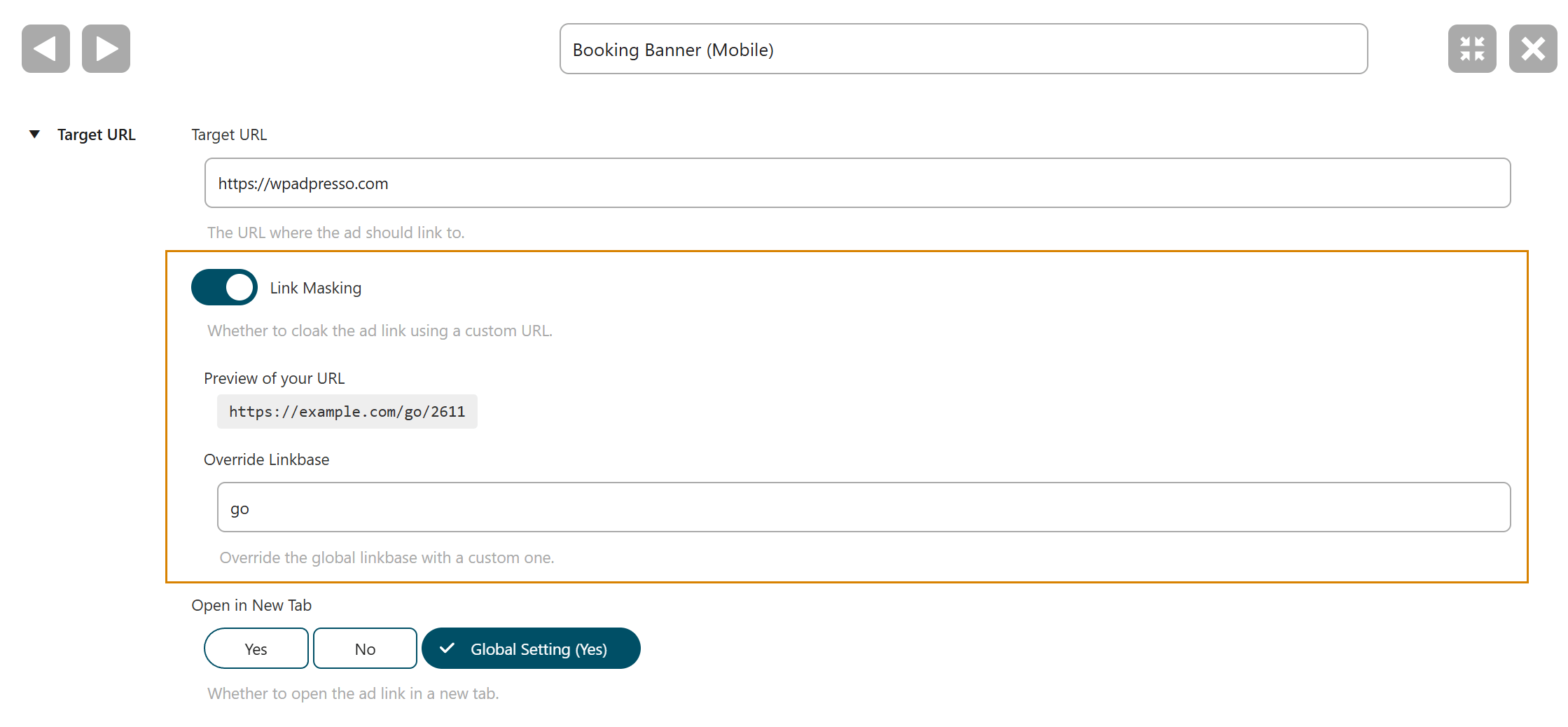
Manual masking is technically "sexy" but eventually hits what I call the efficiency wall. While the code itself is fast, manually managing it is absolutely not maintainable at scale.
| Manual .htaccess / NGINX | Plugin (AdPresso) | |
|---|---|---|
| Maintenance | High (FTP/SSH edits required) | Low (centralized GUI) |
| Scalability | Poor (Max. 20–50 rules) | Excellent |
| Error Risk | Extreme (syntax error = site down) | Minimal |
| Performance | Best (at low volume) | High (optimized & cached) |
| Tracking | None (blind spots) | Integrated (real-time analytics) |
| SEO Control | Manual (high effort) | Automated (SEO standards) |
If you're masking three links, stick to the code. If you're scaling a business, you need a system that eliminates human syntax errors and fills the data vacuum. Manually managing hundreds of lines of Regex isn't marketing—it's server archaeology.