Short answer first: yes. Visitor-dependent ads are automatically resolved in the browser instead of being baked into the page your cache stores—there’s nothing to set up, because there’s nothing to configure in the first place. The rest of this page explains why that’s the case and what it means for your specific caching setup.
Full-page caching speeds up WordPress sites by generating the finished HTML response once, then serving that same response, unchanged, to every visitor for a while—without PHP or the database having to do the work again on each request. That works great for content that’s supposed to look the same for everyone.
It becomes a problem the moment part of the page needs to differ depending on who’s looking at it. That’s exactly the situation with targeted ads: an ad meant to appear only on mobile devices, only for visitors with a particular browser language, or only after a consent decision has been made. If an ad like that got baked permanently into the cached HTML, every visitor after the first would see that exact same version — whether or not the condition actually applied to them. In the worst case, the cache then keeps serving the wrong ad, an outdated one, or one that should never have been shown without consent in the first place.
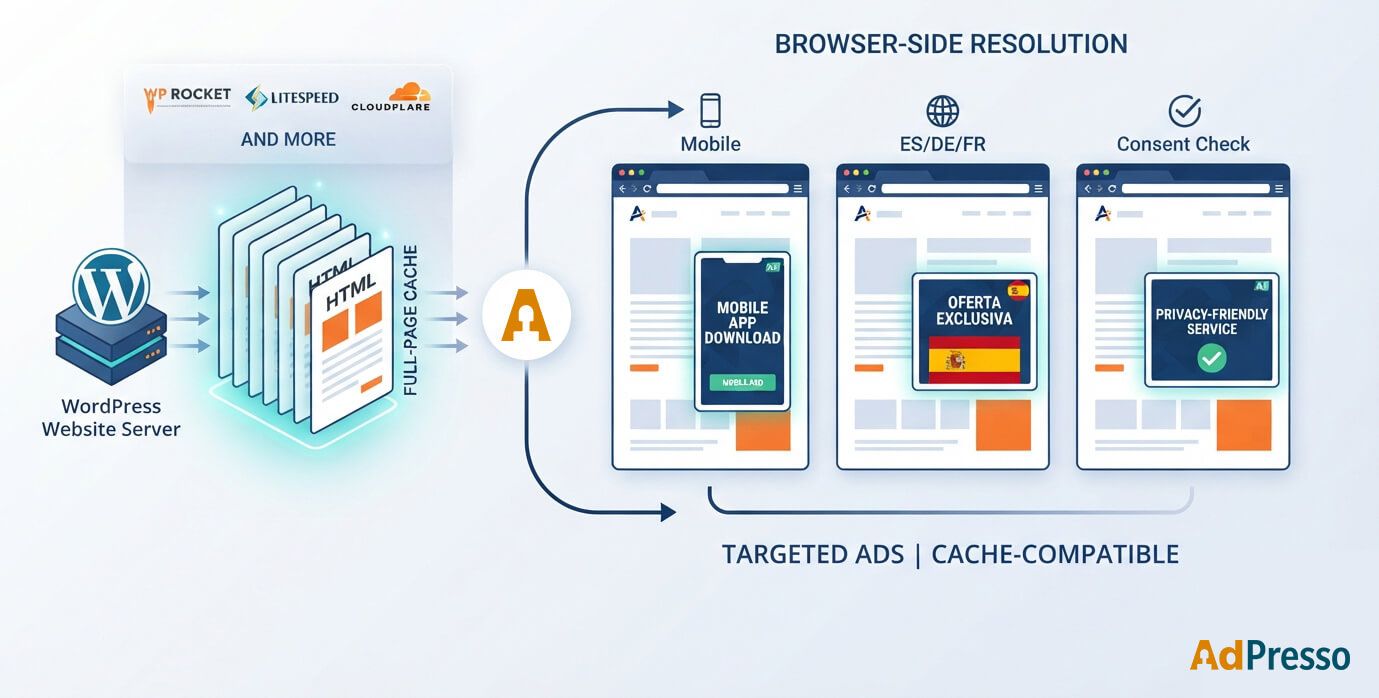
For every ad placement, on every page load, AdPresso asks: does choosing this ad depend on something that’s only known in that particular visitor’s browser (device type, browser language, consent status, and similar signals)? If so, that placement never ships with a fixed ad already baked in. Instead, the server includes only a generic, visitor-agnostic “recipe” — which candidates are eligible and what rules decide between them. The actual choice, which ad actually shows, happens afterward, in each visitor’s own browser, once the page has loaded.
For a full-page cache, that means the page it stores contains nothing visitor-specific at those spots. It can reuse that cached page for any number of visitors without hesitation, because the personalization itself was never part of the cached HTML to begin with.
That’s why AdPresso deliberately doesn’t have a “make this cache-compatible” setting. Not because the topic was overlooked — but because it’s solved structurally, before it would ever need to become a setting. A missing toggle here isn’t a missing feature.
An ad with no visitor-dependent targeting — say, a simple image banner that’s meant to look the same for everyone — becomes a normal part of the server’s HTML output, and gets cached in your full-page cache just like any other static page content. That’s not an AdPresso quirk or a bug — it’s exactly the expected, desired behavior: if an ad is supposed to be the same for everyone, it’s fine for it to be cached the same way for everyone too. Only ads whose selection is genuinely visitor-dependent take the other path.
The following solutions were specifically taken into account while building AdPresso — not because AdPresso actively controls them, but because the mechanism described above works regardless of which one you’re running.
| WP Rocket | Full-page cache plugin. Works with AdPresso without any extra configuration. |
| LiteSpeed Cache | Particularly relevant on LiteSpeed servers with server-side full-page caching. Same principle applies. |
| WP Super Cache | Simpler, widely-used caching plugin. Same principle applies. |
| SG Optimizer (SiteGround) | SiteGround’s own built-in full-page cache. Same principle applies. |
| Kinsta | Host-level, server-side full-page caching (not something you configure as a plugin; it runs at the infrastructure layer). The same principle still holds, because personalization is kept out of the HTML before caching ever comes into play. |
| WP Engine | Also host-level full-page caching. Same principle applies. |
| Cloudflare | (used as a full-page cache/CDN in front of WordPress) — if Cloudflare is caching complete HTML responses, the same mechanism applies: what the server sends out contains no fixed ad at visitor-dependent spots, regardless of exactly where that HTML response ends up being cached along the way. Custom Cloudflare configuration (Page Rules, Workers, and so on) is outside anything AdPresso can influence or test. If you’re running unusual custom Cloudflare rules, it’s worth doing a quick spot-check after setting things up. |
“Cache busting” usually refers to techniques that make sure visitors don’t get served a stale, cached version of a file or page — for example, right after an update. Because AdPresso never writes visitor-dependent ad content into the cached HTML in the first place, there’s nothing to “bust” for that content: there’s no stale version to work around, because the actual ad selection happens fresh, in the browser, on every page load.
No. Visitor-dependent ad selection needs no configuration on your end — it follows automatically from the architecture described above.
Not automatically, no. For developers and agencies who want to wire this up themselves: there’s a hook (adpresso_clear_page_cacheyou can attach your own cache-purge logic to.
Generally yes, following the same principle as any other full-page cache — though AdPresso can’t know about or test your specific Cloudflare configuration (custom Page Rules, Workers, and so on). With a standard setup, it should work without any extra steps on your part.
Not in the same sense, and it doesn’t need it — because the mechanism works differently. Based on their published documentation: Advanced Ads offers a Cache Busting module (Advanced Ads Pro only, under Settings → Pro → Cache Busting) that you enable manually, globally and/or per placement, with a choice between “passive” busting (all possible ad candidates get preloaded into the page’s HTML and JavaScript picks the right one) and an AJAX mode (ads are requested from admin-ajax.php after the page loads). Ad Inserter offers a free, opt-in setting per ad block (under its Insertion tab) that disables page caching entirely for any page containing that block, plus separate “Dynamic blocks” modes that show or insert ad code client-side for cache compatibility.
Both are real, working approaches — but in both cases, you have to know which ads need it, remember to turn it on, and (for Advanced Ads) be on the Pro tier to access it. AdPresso doesn’t expose an equivalent setting because it doesn’t need one: the SSR/JS decision is made automatically, per placement, on every request, based on whether that specific placement’s targeting actually requires browser-side data — not as a global or per-block toggle you have to remember to flip.
No. It’s a structural part of the rendering architecture, not a feature you turn on or off — it applies the same way in both the free and Pro versions.
If you want the technical detail on exactly how AdPresso decides between server- and client-side rendering per placement (relevant if you’re extending AdPresso or evaluating the architecture), see the developer documentation: The Rendering Pipeline: SSR vs. JS Output Per Placement.
