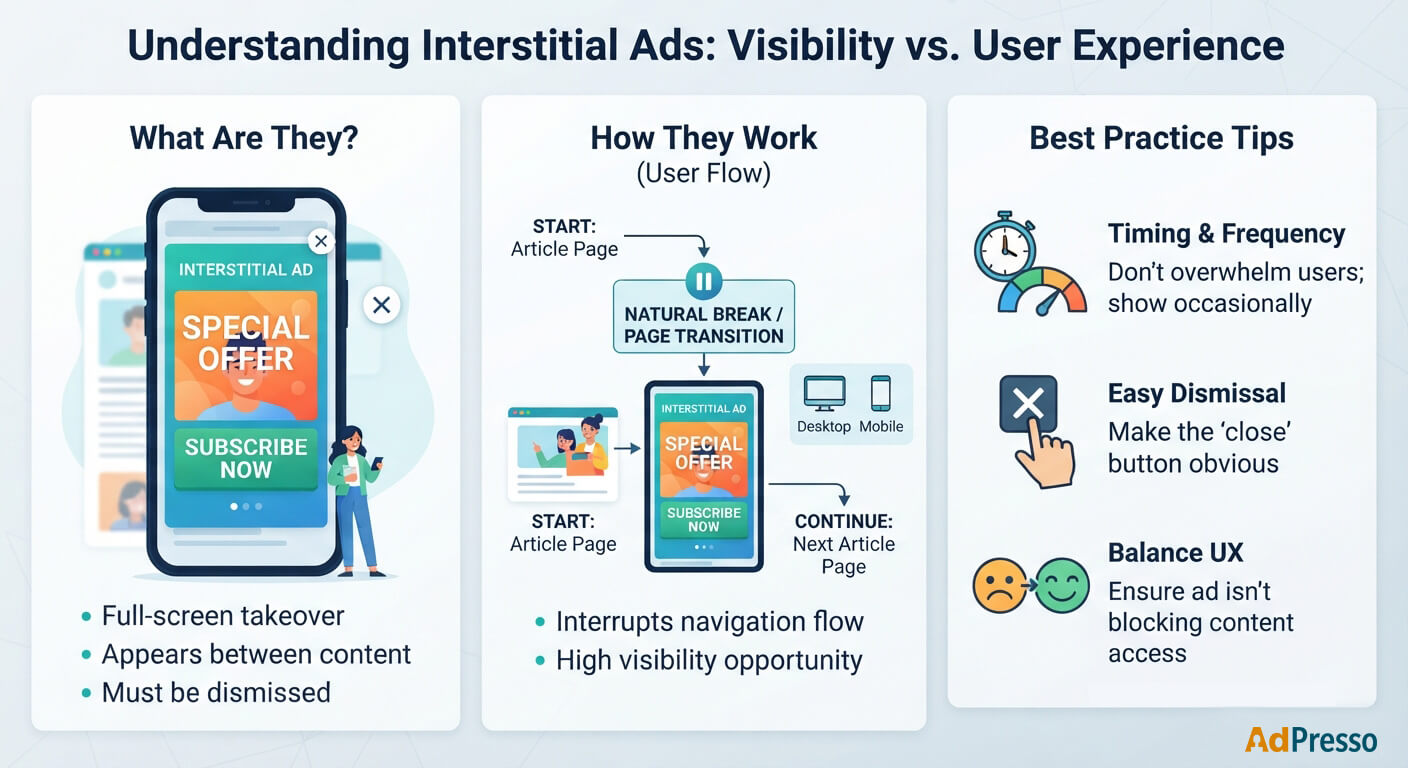
Interstitial ads are full-screen ads that appear between two pieces of content or during a transition between pages. Unlike a banner that sits within the page layout, an interstitial temporarily takes over the available screen and asks the visitor to interact with or dismiss the ad before continuing.
You may already know interstitials from mobile apps, where they are often shown between game levels or other natural breaks. The same basic idea works on websites. A publisher can show an interstitial when a visitor moves to another page, reaches a defined point in the browsing session, or is about to leave the site.
For website publishers, the format offers strong visibility, but it also comes with a simple rule. If the ad gets in the way of the content, visitors notice that before they notice the advertising message. Good timing and sensible frequency therefore matter just as much as the ad itself.
An interstitial temporarily appears above the page content and usually covers most or all of the visible screen. The visitor can then view the ad, interact with it, or close it and continue browsing.
On desktop websites, an interstitial might appear between two page views. On mobile, the format typically uses the entire available viewport because screen space is limited. The exact implementation varies between publishers. Some interstitials appear immediately after a page loads, while others trigger on a specific action or point in the user journey.
The important difference from a conventional display ad is the interruption. A banner can be ignored while the visitor continues reading. An interstitial cannot be ignored in the same way because it temporarily sits between the visitor and the content.
Interstitials are sometimes grouped with overlay ads and popups, but the terms are not interchangeable. An overlay can cover part of a page while leaving the underlying content visible. An interstitial is generally designed as a transition screen and takes up most or all of the viewport.
This also distinguishes interstitials from sticky ads. A sticky ad remains attached to an edge of the viewport while the visitor continues using the page. An interstitial temporarily interrupts that interaction.
| Format | How it Appears | User Interaction |
|---|---|---|
| Standard banner | Within the page content or layout | Can usually be ignored |
| Floating ad | Fixed to an edge of the viewport | Content remains accessible |
| Overlay | Above the existing page content | May cover part of the page |
| Interstitial | Between content or page views | Usually requires dismissal before continuing |
The main attraction is visibility. An interstitial occupies a large part of the screen, so it is hard to overlook. This gives advertisers a prominent opportunity to communicate a message without competing with other page elements.
For publishers, the format can also create an additional advertising opportunity without adding another banner to the article itself. This can be useful on sites where the regular content area is already crowded with display placements.
The trade-off is obvious. More visibility also means more interruption. A visitor who encounters an interstitial at every page view may become frustrated quickly, especially on mobile where the ad can completely block the content.
That makes frequency an important part of the setup. An interstitial shown occasionally at a natural transition feels very different from one that appears every time someone opens another article.
Interstitials work best when there is already a natural break in the browsing experience. For example, a publisher might show one between page views or after a visitor has spent some time on the site.
They can also support specific campaigns. A publisher could use an interstitial to promote a newsletter, a seasonal offer, a subscription, or a relevant commercial campaign. In these cases, the format is not simply another display placement. It becomes a temporary message between two parts of the website.
Mobile websites require particular care. An interstitial that covers the entire viewport leaves very little room for the visitor to ignore the ad. The close button therefore needs to be easy to find and use, and the ad should not make it unnecessarily difficult to return to the content.
Interstitials create a familiar monetization trade-off. A format that demands attention can generate strong advertising exposure, but demanding attention too often can damage the browsing experience.
Timing is one of the most important variables. Showing an interstitial as soon as a visitor arrives gives the ad maximum exposure, but the visitor has not had any time to engage with the site. Showing it after the visitor has read an article or visited another page creates a different context.
Ad frequency matters just as much. A publisher should consider how often the same visitor can encounter an interstitial rather than treating every page view as a new opportunity. Finally, the close button deserves attention too. It should be clearly visible and work reliably on both desktop and mobile. Hiding or delaying dismissal may increase exposure for the individual ad, but it also changes how the website feels to use.