The half-page ad is a large vertical display ad format designed for websites with enough space alongside their main content. The standard size is 300 × 600 pixels. Despite its name, the format does not take up half a website. The name refers to the large amount of vertical space available to the creative.
For publishers, the halfpage ad is particularly relevant for desktop layouts with a sidebar or another defined advertising area next to the main content. The format gives advertisers considerably more room than a standard rectangle while fitting into many common two-column website layouts.
A half-page ad is a vertical display advertising format measuring 300 × 600 pixels. The IAB introduced this size as the standard specification for the half-page unit. Google also lists 300 × 600 as a half-page ad.
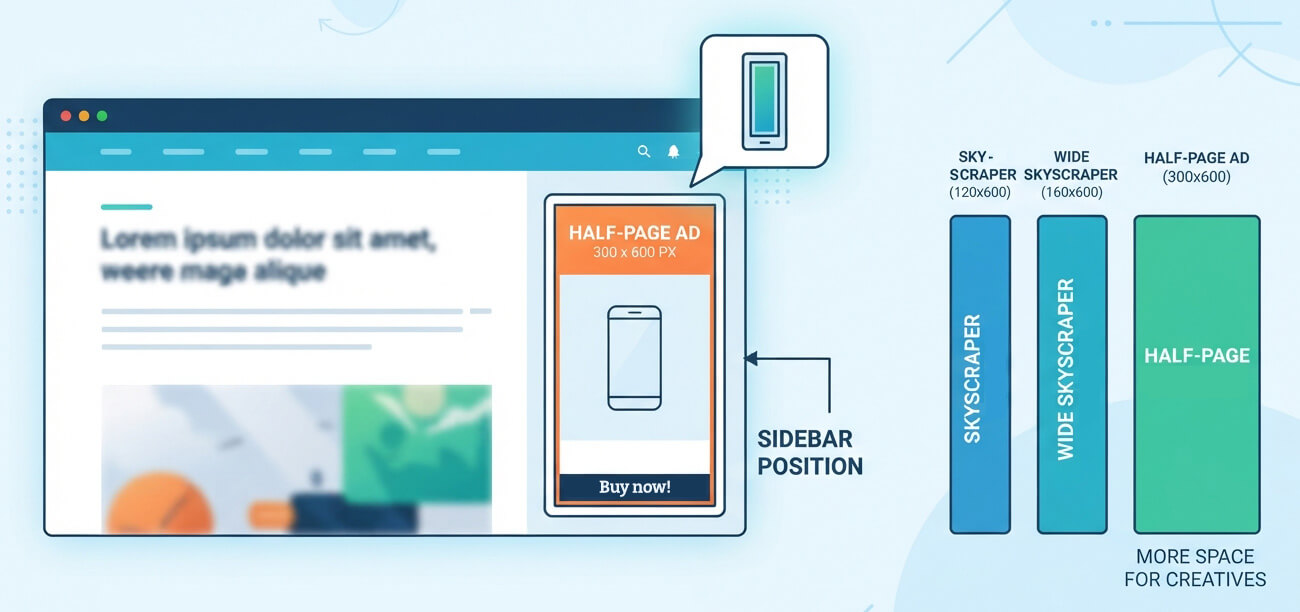
Publishers usually embed this format next to editorial content rather than above it. A typical example is a blog article with the text in the main column and a half-page ad in the sidebar. Depending on the website layout, publishers can also use the format in other vertical advertising areas.
The 300 × 600 dimensions give advertisers enough room for product images, branding, text, and calls to action without requiring a full-width advertising slot. This makes the format useful for campaigns where the creative needs more space than a 300 × 250 medium rectangle can provide.
| Specification | Half-page Ad |
| Standard size | 300 × 600 px |
| Aspect ratio | 1:2 |
| Format | Vertical display ad |
| Typical environment | Desktop web |
| Typical position | Sidebar or vertical ad area |
| Common creative types | Image and HTML5 |
| Main advantage | Large vertical creative area |
| Main limitation | Requires sufficient vertical space |
The classic position is the sidebar of an article or other content page. A half-page ad works particularly well when the sidebar stays visible for a substantial part of the page and has enough height to accommodate the full creative.
This is different from a leaderboard or Billboard Ad, which uses horizontal space above or within the main content. A half-page ad uses the space beside the content instead. On a website with a wide main column and a narrow sidebar, this can use the available layout better than trying to place another large horizontal format above the article.
Position also affects how often visitors can see the ad. A 300 × 600 unit placed far below the beginning of an article may have considerably less exposure than the same format positioned near the top of the sidebar. Publishers should therefore look at viewability data rather than judging a placement only by its dimensions.
The half-page ad belongs to the same general family as skyscraper formats because both use vertical advertising space. The main difference is width and available creative area.
| Format | Size | Typical use |
|---|---|---|
| Skyscraper | 120 × 600 px | Narrow sidebar areas |
| Wide Skyscraper | 160 × 600 px | Wider sidebar areas |
| Halfpage Ad | 300 × 600 px | Large sidebar or vertical ad areas |
Google lists 120 × 600 as skyscraper, 160 × 600 as wide skyscraper, and 300 × 600 as half page. The larger half-page format therefore needs substantially more horizontal space than the traditional skyscraper formats.
For publishers, the choice often depends on the layout rather than the format name. A narrow sidebar may only accommodate a 120- or 160-pixel-wide creative. A modern desktop layout with a wider advertising column can support 300 × 600 without squeezing the editorial content.
The first question is whether the website actually has a suitable advertising area. A 300-pixel-wide ad needs enough space without making the main content column unnecessarily narrow. On smaller screens, the same sidebar may disappear or move below the article entirely.
Responsive behavior therefore matters. Publishers should not force a half-page ad into a mobile layout where the creative becomes too large for the available viewport. Instead, publishers can use separate ad sizes or responsive ad setups for different screen widths.
The vertical height also deserves attention. A 600-pixel ad can create a substantial empty area if the creative does not load or if the placement reserves space without receiving an ad. Publishers should account for this when designing the layout and defining the ad slot.
For WordPress publishers, the main challenge is usually not inserting the 300 × 600 creative itself. The more useful question is where the ad should appear and which content should receive it.
AdPresso placements provide predefined positions for automatic ad delivery, so publishers can manage the ad without adding code to individual posts or modifying theme files. Placement conditions can determine where to show an ad based on factors such as device or content type.
For example, you can assign a half-page ad to a suitable sidebar position and limit it to desktop visitors if the mobile layout doesn’t provide enough room. The exact implementation depends on the WordPress theme and how its sidebar is structured.
No. The format makes the most sense when a website has a genuine vertical advertising area with enough width and height. A content site with a wide sidebar can use the 300 × 600 format well. A narrow blog layout may suit a smaller rectangle or a horizontal format better.
The half-page ad is therefore less about placing the largest available creative and more about matching the ad size to the page structure. When the slot fits naturally into the layout, the format gives advertisers substantial creative space while leaving the main content column available for readers.