Billboard ads are large horizontal display ads that give advertisers considerably more space than a standard banner. The format is usually placed near the top of a desktop page, where its 970 × 250 pixel size can make good use of a wide layout.
For publishers, the main question is whether the page has enough room for the format. A 970-pixel-wide ad doesn’t fit comfortably in every content layout. It needs a suitable slot that leaves enough space for the article itself. The 970 × 250 pixel format is the standard Billboard size defined by the IAB, and Google also lists it among its supported display ad sizes.
A Billboard is a large horizontal display ad for websites, primarily on desktop screens. The format is part of the IAB Rising Stars portfolio and was developed as a larger advertising format with room for richer creative work.
The most common position is above the main content. Some sites place the ad between the header and the article, while others use it in another wide area of the page. What appears inside the slot depends on the campaign. A Billboard can contain a static image, animation, video, or interactive elements.
At 970 × 250 pixels, the format is substantially larger than a 728 × 90 leaderboard. That extra space changes how the ad fits into a website. A Billboard usually needs its own slot rather than simply replacing a smaller banner that was already there. On a site with a suitable desktop layout, it can fill a wide area without forcing the article into a narrower column.
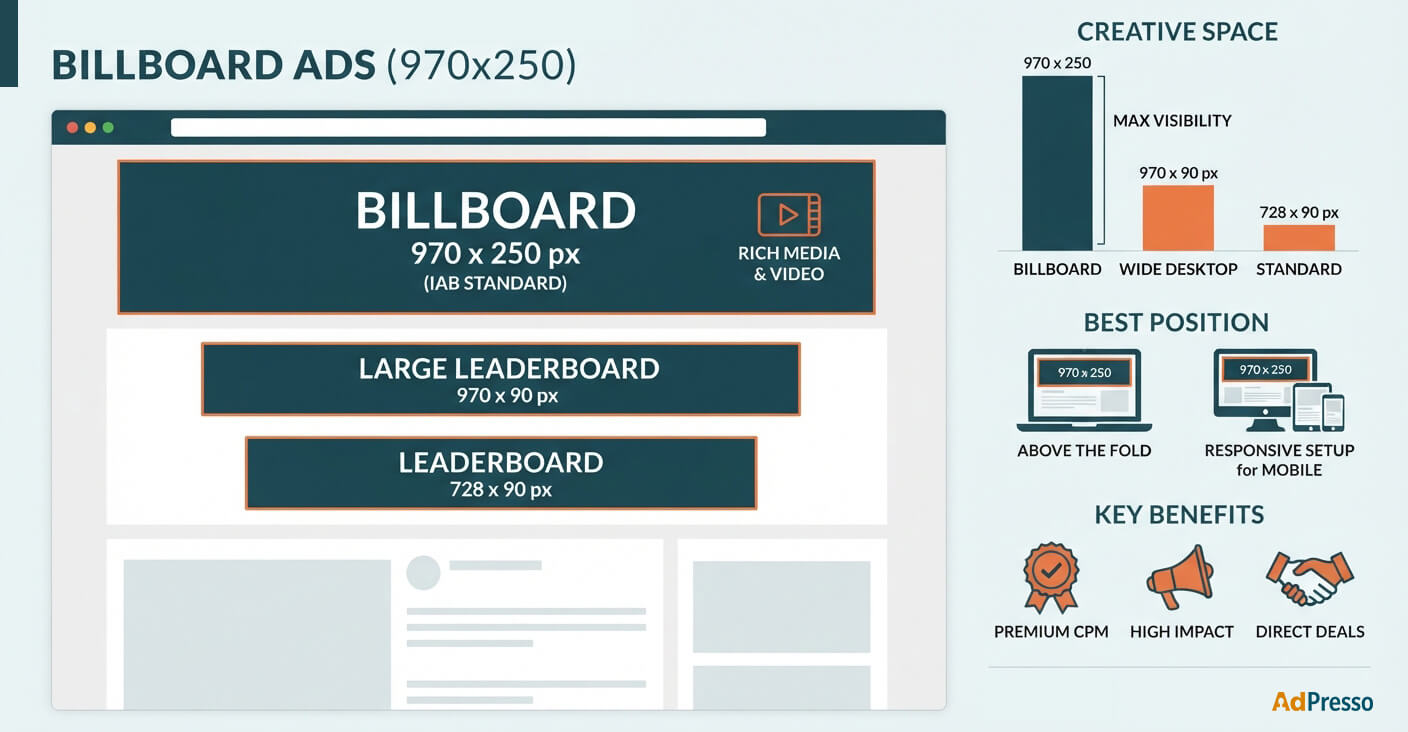
The exact requirements depend on the ad server, SSP, advertiser, or direct campaign. The dimensions below describe the common Billboard format, not a universal technical specification for every implementation.
| Specification | Billboard Ad |
|---|---|
| Standard size | 970 × 250 px |
| Aspect ratio | 4:1 |
| Format | Horizontal display ad |
| Typical environment | Desktop web |
| Typical position | Above or near the main content |
| Creative types | Image, HTML5, and rich media depending on platform |
| Main strength | Large creative area and high visibility |
| Main limitation | Requires sufficient horizontal space |
The IAB New Ad Portfolio lists Billboard as a 4:1 format with a fixed size of 970 × 250 pixels. Its flexible specifications also allow a range from 900 × 225 to 1800 × 450 pixels, reflecting the industry’s move toward layouts that adapt to different screen sizes.
Google’s current specifications also include 970 × 250 under its leaderboard formats and identify it specifically as Billboard.
Placement strongly influences the format’s usefulness. A Billboard usually works best where the available width is already generous, and the ad can be seen without forcing the visitor to search for it.
A position above the article is one common option. A publisher could place the ad below the site header and navigation and directly above the article headline. Another option is to place it between the navigation area and the main content container.
There is an important distinction here. A large format does not automatically make a good ad placement. If the Billboard pushes the article too far down the page, creates excessive space while loading, or causes layout shifts, the additional creative area can become a UX problem.
For WordPress publishers, implementation must account for the actual theme structure. AdPresso placements provide predefined positions for central ad management, rather than adding individual ad code to posts or theme files.
For example, you can assign a Billboard to an appropriate placement and manage it from the WordPress backend. This makes it easier to change the campaign, rotate ads, or adjust the configuration without manually editing the site’s content.
Billboards are often confused with large leaderboard ads because both are wide horizontal formats. The difference is mainly their dimensions and the amount of creative space they provide.
A traditional leaderboard measures 728 × 90 pixels. A large leaderboard can measure 970 × 90 pixels. The Billboard is substantially taller at 970 × 250 pixels. Google lists all three sizes separately in its current display specifications.
| Format | Size | Typical Use |
|---|---|---|
| Leaderboard | 728 × 90 px | Standard horizontal banner |
| Large leaderboard | 970 × 90 px | Wide desktop placement |
| Billboard | 970 × 250 px | Large, prominent campaign placement |
This difference matters for both sides of the market. Advertisers get considerably more creative space with a Billboard. Publishers need to provide considerably more room for it.
The main advantage is the amount of visible inventory available within a single ad slot. A 970 × 250 Billboard gives advertisers enough space for stronger visual creative than a narrow banner.
This makes the format particularly relevant for direct campaigns, premium placements, and brand advertising. Google currently notes that the 970 × 250 size is frequently used for Preferred Deals and private auctions.
It also offers a practical benefit for publishers with a desktop-focused audience. A Billboard can become a clearly defined premium inventory position that publishers can offer separately from standard banner placements.
That does not mean every website should add one. A site with a narrow content container may not have enough usable width. On a mobile page, the 970 × 250 format is also generally unsuitable in its original form. Responsive ad delivery or a separate mobile placement is usually needed.
First, ask whether the site’s layout can accommodate the format cleanly. Measure the actual available content width rather than relying on the overall browser width.
Second, consider what happens while the ad loads. Reserving appropriate space can prevent the page from jumping when the creative arrives. AdPresso placements support layout controls such as margins, alignment, and custom CSS, including the option to define a minimum ad height to reduce cumulative layout shift.
The third consideration is demand. A Billboard takes up substantially more space than a standard banner, so it should have a clear role in your inventory strategy. If campaigns rarely fill the slot, a responsive setup or suitable fallback can help avoid leaving a large area empty.
The classic 970 × 250 Billboard is a desktop format. Don’t simply squeeze it into a narrow mobile viewport.
A responsive advertising setup can instead serve another creative size when the visitor uses a smaller screen. Google’s current display specifications include dedicated mobile formats such as 320 × 50 and 320 × 100.