If you have never worked with tracking pixels before, the name can be misleading. A tracking pixel does not necessarily mean there is a visible pixel somewhere on your website. In most cases, it’s a small piece of code or a tiny invisible image that tells a third party something happened on your site.
Pixel tracking helps publishers manage ad campaigns, track conversions, and attribute affiliate sales. However, dropping a pixel onto your site isn’t just a technical quick fix—you need to know exactly what data it collects, who gets it, when it’s permitted to fire, and whether it’s even necessary.
The name is a bit of a legacy term. Originally, a tracking pixel was literally an invisible 1x1 image that fired a signal to a server whenever someone opened a page.
Modern pixels—like Meta, TikTok, or LinkedIn Insight—are actually small JavaScript snippets. Instead of just logging visits, they record specific actions: clicks, signups, or checkouts. But whether it’s a tiny GIF or a JS tag, the core idea hasn’t changed. Your site pushes activity data to a third-party platform so you can track conversions and optimize ad campaigns.
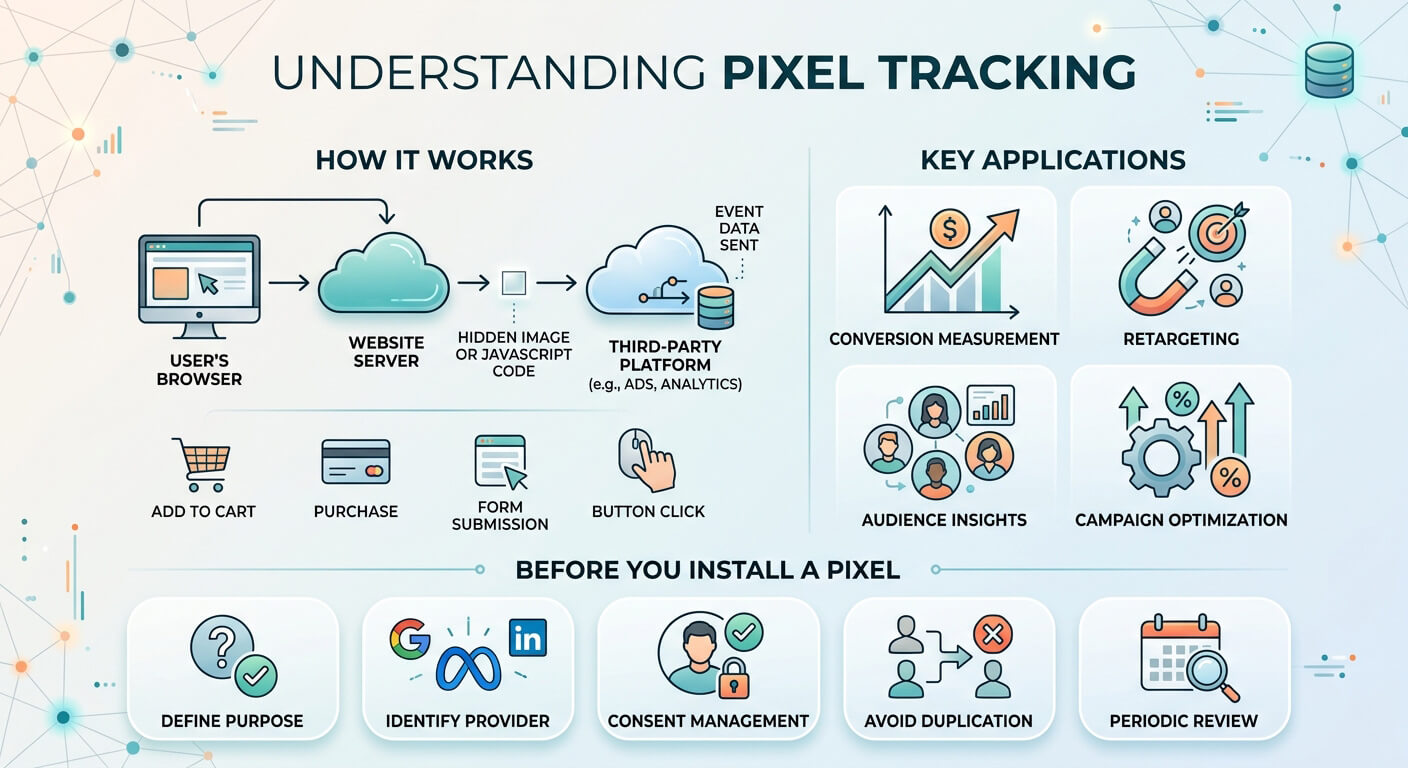
Tracking pixels bridge the gap between your website and your ad platforms. When a visitor triggers a snippet on your page—by reading an article or submitting a form—that event is sent back to the network (like Google Ads, Meta, or LinkedIn).
This connection lets ad platforms tie website actions back to specific ad clicks. The data is then used to measure conversions, build retargeting audiences, and optimize campaign performance.
While a basic page view is the default trigger, you can capture far more specific user actions, including:
| Event | Typical Use |
|---|---|
| Page view | Measuring visits or building audiences |
| Product view | Measuring interest in a product |
| Button click | Tracking a specific interaction |
| Form submission | Measuring leads |
| Add to cart | Measuring shopping activity |
| Purchase | Measuring sales and campaign conversions |
| Signup | Measuring registrations or subscriptions |
| Download | Measuring content or lead generation |
The exact events and available parameters depend on the platform. Pinterest, for example, supports events ranging from PageVisit and ViewContent to AddToCart, Checkout, Lead, and Purchase-related actions.
Pixels always come from the platform receiving the data. In practice, that usually means ad networks and analytics tools—think Meta, Google, TikTok, LinkedIn, or Pinterest.
But just because a platform offers a pixel doesn’t mean you should install it. If you’re not actively spending money on TikTok Ads, dropping a TikTok Pixel onto your site is just useless bloat.
Every script you add slows down page loads, adds maintenance overhead, and sends user data to another third party. Only install tags for platforms you actually use to make decisions or drive traffic.
If you sell digital products, subscriptions, or run paid campaigns to build a newsletter, pixels connect the dots. They show you exactly which ad click led to a paid signup or lead—so you know where your marketing spend actually works.
Ad platforms use pixel data to group site visitors into custom audiences. That lets you re-engage readers who dropped off a checkout page, or help direct advertisers target people who spent time in a specific section of your site.
Pixels can also be part of affiliate tracking systems. Depending on the affiliate program, they can measure conversions or pass action information back to the affiliate platform.
This is especially relevant when the publisher does not control the final transaction. The affiliate network may provide a conversion pixel or another tracking mechanism that needs to be triggered on a specific page or after a particular event.
Certain tracking systems analyze visitor behavior by logging metrics like page views, event triggers, and referral sources. For publishers, the distinction between analytics and advertising pixels is useful. An analytics system might primarily help you understand your own website. An advertising pixel generally also sends information to an external advertising platform for campaign measurement, audience creation, or optimization.
Publishers should not treat this as an afterthought. A tracking pixel can result in information about a visitor or their behavior being transmitted to a third party. Depending on the provider and configuration, this can involve cookies, identifiers, page URLs, event information, or other parameters.
Whether a particular tracking technology requires consent depends on the technology, purpose, jurisdiction, and implementation. European publishers in particular should integrate tracking into their consent management setup rather than simply loading every available tag when a page opens.
The provider’s own documentation also matters. LinkedIn, for example, distinguishes between its JavaScript-based Insight Tag and event-specific image pixels, noting that the latter can be less accurate. LinkedIn also restricts the Insight Tag on pages containing sensitive data.
The same principle applies beyond LinkedIn. Don’t assume a small script is harmless just because it is technically easy to install. Before adding a pixel, check what it collects, where the data goes, what the provider uses it for, whether consent is required, and whether your privacy documentation reflects the integration.
Duplicate tracking usually happens when a pixel gets added through a WordPress plugin and then gets forgotten, and someone else later drops the same script into Google Tag Manager.
That double-counting completely skews your numbers. When ad platforms see $500 in sales instead of $250, their automated bidding algorithms optimize against inflated revenue signals.
If you’re running browser tags alongside a server-side API, passing matching Event IDs handles deduplication on the platform’s side. The easiest way to avoid the headache in the first place, though, is just keeping a quick document of every active script, where it lives, and what fires it.
Browser-based pixels are simple to drop into a site, but they’re getting less reliable by the day. Between strict ad blockers, browser privacy updates like Safari’s ITP, and cookie consent choices, a good chunk of your event data vanishes.
To handle this, networks like Meta and TikTok offer Server-Side APIs. Sending events backend-to-backend bypasses browser extensions entirely, so your conversion data actually makes it through.
Just remember: changing the data pipeline doesn’t change privacy laws. You still need proper consent disclosures regardless of whether a hit fires from a browser script or your server.
WordPress publishers have several ways to add tracking code. The simplest option is often a dedicated integration supplied by the tracking provider. A tag manager is another common approach when a website uses several marketing and analytics tags.
For publishers who want to manage tracking code together with their advertising setup, AdPresso can also be useful. Its Header Code placement is designed for technical code that needs to be inserted into the site’s head area, including tracking pixels and scripts. Its Footer Code placement can be used for scripts that should load later in the page lifecycle. This can be practical when you already manage your advertising inventory in AdPresso and want to keep related code in the same WordPress backend instead of editing theme files.
The key point is that AdPresso does not automatically turn an arbitrary tracking script into a privacy-compliant integration. You still need to decide when the script may run and what data it sends. Consent management, provider settings, and the purpose of the tracking remain separate responsibilities.
Before adding any tracking pixel to your WordPress site, answer a few basic questions.
Define the event before installing the technology. A page view, newsletter signup, and purchase require different tracking.
Know which company operates the pixel and what information is transmitted.
Check the legal requirements for your visitors and the specific implementation. Do not treat all pixels as technically or legally identical.
A sitewide pixel and a conversion pixel have very different purposes. Some code belongs on every page, while other events should only fire after a specific action.
Check your plugins, tag manager, theme, and other integrations before adding another copy.
Most providers offer tools to check whether they receive events. Pinterest, for example, provides event testing in its Ads Manager.
Tracking code tends to accumulate. Review old pixels regularly and remove integrations that no longer serve a purpose.
Pixels don’t magically grow a business. They’re just logs. If you’re on WordPress, script bloat happens naturally over time. My rule of thumb here is simple: if you aren’t logging into that ad account this month, remove its tag.
Make sure your consent banner actually holds back the scripts that remain, and write down what you’ve got installed so you don’t end up troubleshooting ghost code later.