Ad links tend to get messy fast. On affiliate-driven sites in particular, target URLs often include layers of parameters such as affiliate IDs or campaign tracking. The result is a long, cluttered link that looks untrustworthy and can hurt click performance.
Link masking solves exactly that. Instead of exposing complex URL structures, AdPresso Pro delivers clean, short, and readable links that create more trust, improve click-through rates, and keep your site visually consistent.
AdPresso generates a masked link for each ad based on a defined URL structure. You control this structure globally and can override it for individual ads when needed.
Start by defining your global link structure. Go to AdPresso > Settings > General > Output.
There you will find the Linkbase setting. Here, you can define the path that appears between your domain and the generated ID. It serves as the default for all masked links and ensures a consistent structure throughout your setup.
A common example would be: https://example.com/go/123456.

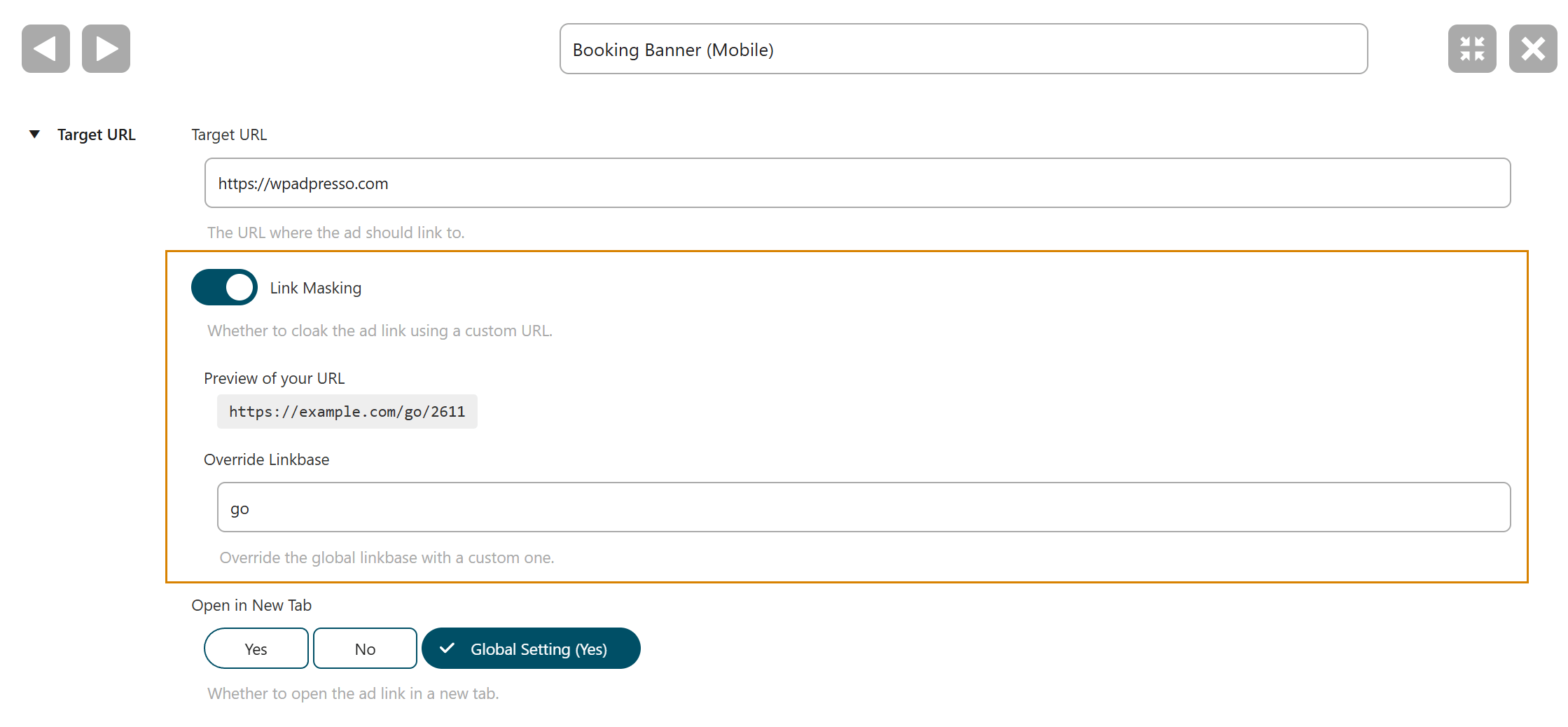
Next, open the ad whose link you want to mask and scroll to the Target URL section. Enable the Link Masking toggle.
As soon as you activate it, AdPresso shows a preview of the masked link, giving you an immediate view of how the final URL will appear on the frontend.
Right below the preview, you can define a custom placeholder to override the global linkbase for this specific ad.
For example, you could turn https://example.com/go/123456 into https://example.com/recommended/123456 and tailor the link structure to better match the context of that placement.
Save your changes, and AdPresso will now output the masked link instead of the original one in the frontend.
