If you run advertisements on WordPress, there is a fundamental metric you might be missing: Active View Tracking (AVT). Generating ad impressions is no longer enough because advertisers and publishers alike demand proof that ads are actually seen by human visitors. But how do you reliably measure ad viewability right inside WordPress?
In WordPress, there are several ways to approach it, but most require third-party systems or custom development. AdPresso Pro takes a different route with native Active View tracking built directly into the ad management workflow.
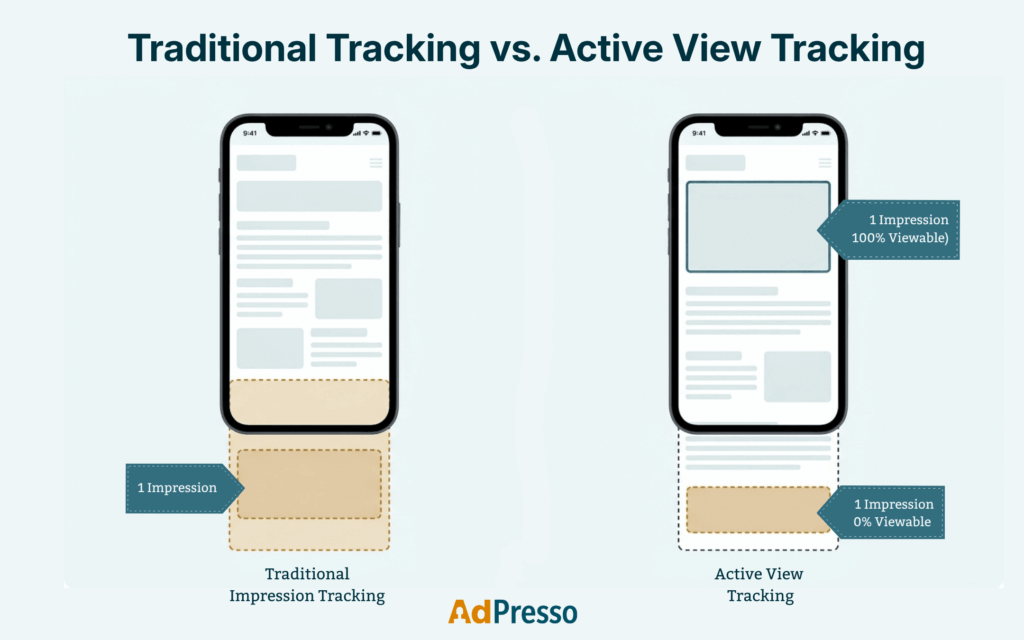
By default, WordPress ad management plugins like Advanced Ads, Ad Inserter, AdSanity, or WPQUADS count an "impression" the exact millisecond an ad container is initialized in the DOM. If a user lands on your article, reads the first two paragraphs, and leaves, any ad placed in the footer or mid-article is still logged as served.
From an advertiser's perspective, that impression was worthless. Industry standards (defined by the IAB and MRC) require an ad to have at least 50% of its pixels in the viewport for at least one continuous second to qualify as a viewable impression. Without Active View Tracking, your analytics can inflate reach while hiding poor placement efficiency.
When WordPress site owners realize they need ad viewability data, they generally face two paths, both with significant drawbacks.
If you rely exclusively on Google AdSense or Google Ad Manager, Google automatically measures Active View data within its ecosystem. You can view Active View percentages inside your Google reports. However, this data is locked inside Google’s walled garden. It does not help you evaluate self-hosted ads, direct affiliate banners, sponsor placements, or alternative ad networks.
To track custom or direct ads, some developers construct complex JavaScript setups utilizing the IntersectionObserver API. This code detects when an ad element scrolls into view and fires custom events to GA4. While theoretically functional, this approach is unhandy, technical, and excessively complicated. Mapping event parameters in GA4 back to specific WordPress ad IDs, groups, or placements requires custom dimensions, intricate Looker Studio dashboards, and constant maintenance. Moreover, sending every viewability state to external analytics endpoints creates overhead and potential GDPR compliance friction.
Instead of wrestling with custom event pipelines or relying strictly on third-party ad networks, WordPress publishers need direct, native sightlines into their ad performance. That’s why AdPresso Pro includes built-in, client-side Active View Tracking.
AdPresso measures true viewability directly within the browser using lightweight, performance-optimized observers. Rather than bloating your site with heavy scripts, it tracks the exact visibility state and logs it securely via local tracking.
Activating local Active View Tracking requires no coding or external API keys:
Once enabled, AdPresso transforms raw counts into actionable performance metrics directly in your WordPress statistics dashboard. You don’t just get a site-wide average; instead, you can easily filter Active View metrics down to individual ads, ad groups, and placements to discover exact layouts and locations (e.g., Above the Fold, In-Content, Sidebar, Sticky Footer) that yield the highest viewability rates.
Accurate ad visibility metrics shouldn’t require custom data pipelines, GA4 workarounds, or heavy third-party scripts. By building privacy-first Active View Tracking directly into the WordPress admin, AdPresso Pro gives publishers complete control over their ad performance right out of the box.
Most standard ad management plugins count impressions the moment the ad code initializes in the DOM, regardless of visibility. AdPresso Pro is currently the only WordPress plugin with built-in, native Active View Tracking. It measures actual ad viewability according to IAB standards directly inside your browser, without requiring third-party tools, complex GA4 workarounds, or external networks.
No. Viewability is measured client-side using modern, lightweight browser observers designed for minimal resource usage. Because tracking is handled completely locally on your WordPress site, it causes no noticeable performance lag or external script dependencies. This approach also ensures your ad data remains fully privacy-compliant out of the box.