The Activate Ads module gives you central, high-level control over when, where, and for whom ads are displayed. Instead of juggling dozens of conditions for every placement or ad unit, you manage ad delivery at the structural and global levels.
Such a central approach is beneficial for publishers running member areas, multi-author environments, or sites with mixed content types where certain sections should remain ad-free.
The module follows a strict hierarchy to avoid conflicting rules and to keep your ad setup predictable. At the top, the master switch “Activate all ads in the frontend” sits. If you turn this off, AdPresso will stop serving ads anywhere, no matter how granular your other settings are.
Below that level, you work with individual page types, grouped into clearly defined categories. Some are singular, like posts and pages, while others bundle multiple templates together, such as “Other Pages,” which includes 404, archive, and tag pages, as well as search results.
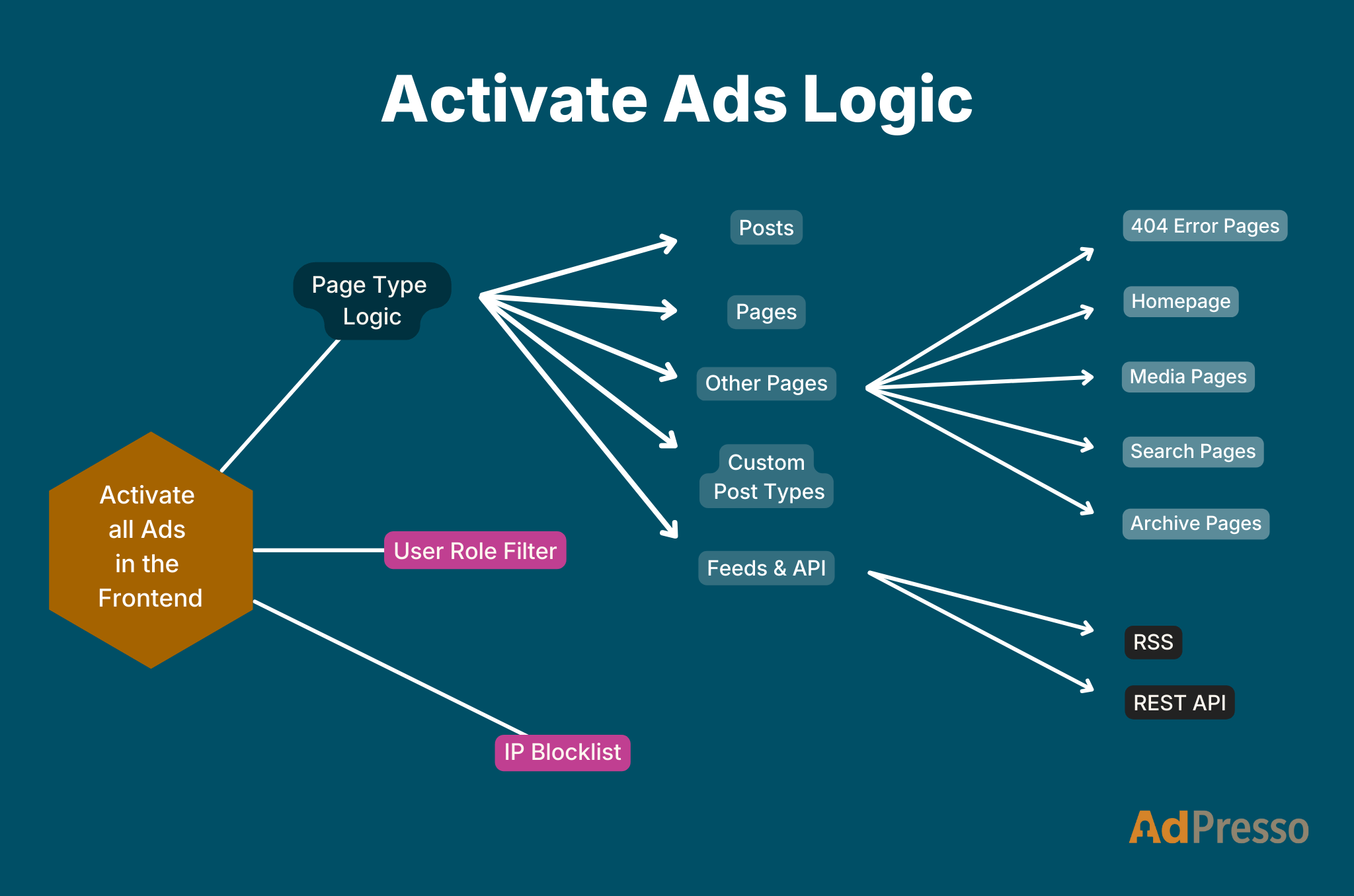
AdPresso automatically detects all registered user roles on your site. Therefore, it is easy to exclude specific groups from receiving ads, which is especially valuable for premium memberships, subscriber-only areas, editorial teams, or intranet-like setups.
A single toggle determines whether ads appear for each role. If you want to keep paying members ad-free while still monetizing guest users, this is the tool to use.
Note: Changing the default delivery behavior can introduce a minor impact on page performance.
You can also exclude certain IP addresses from seeing ads. IP blocking can be useful for internal teams, agencies, staging environments, or recurring testers. The supported formats include both IPv4 and IPv6, for example:
Each line represents one individual IP. Ranges are not supported.
Keep in mind that IP-based filtering requires dynamic ad delivery, which may slightly reduce your page speed.
At the top of the hierarchy sits the master control for all ad delivery. When you turn it off, the entire frontend becomes ad-free, which makes it a practical tool for testing, troubleshooting, or temporarily pausing your monetization setup.
AdPresso gives you fine-grained control over whether ads appear on individual blog posts. Because articles often account for a large share of organic traffic, enabling ads here ensures consistent monetization across your editorial content.
Utilizing this option, you can handle static WordPress pages such as about, contact, or legal notice separately from posts. Many publishers use these pages for trust-building or evergreen information, so having an independent toggle helps you keep the user experience intentional.
AdPresso bundles templates that don’t fall into the classic post or page categories under this setting. It includes the 404 error page, archive views, author listings, tag pages, and internal search results, allowing you to manage these layouts collectively without creating multiple individual rules.
When visitors land on a non-existent URL, they see your 404 page. You can choose whether that page should carry ads, depending on whether you want a clean, utility-focused layout or prefer to reclaim lost traffic with a bit of monetization.
Your site’s main landing page often receives the broadest audience, regardless of whether it shows a static layout or the latest posts. Controlling ad delivery here helps you balance first impressions with revenue opportunities.
WordPress generates standalone attachment pages for images, documents, and other media files. These pages contain little more than the file itself plus your site’s framing elements, yet they still attract occasional traffic. With this setting, you can decide whether to disable ad delivery globally on these low-content pages to maintain a cleaner experience.
Internal search result pages can deliver strong contextual performance because users who search tend to have a clear intent. With this setting, you decide whether those pages should participate in your ad inventory.
Collections of posts, such as category archives, author overviews, tag archives, or date-based lists, often attract consistent informational traffic. Allowing ads on these pages helps you monetize those content clusters in a structured and predictable way.
Custom content formats such as products, recipes, portfolios, listings, or events often follow their own editorial logic. This option lets you turn off ads across those content types in one step when monetization doesn’t fit the context, or when you want to keep these sections ad-free by design.
Content often travels beyond the website itself, and this control determines whether to include ads in such external outputs.
Your RSS feed can include ads if you want to monetize subscribers who consume content through readers or syndication tools. Some publishers prefer a clean feed, while others use it to extend their inventory.
Headless setups, mobile apps, and external integrations often rely on the WordPress REST API. With this toggle, you decide whether to expose ads to external consumers in the returned data.